[軟體] Canon Digital Photo Professional 3.0


2007/04/04 17:00 10,254Views


隨著「Canon 1D Mark III」的上市, CANON 的 RAW 轉檔軟體「Canon Digital Photo Professional」(以下簡稱 DPP) 也推出了 3.0 版。
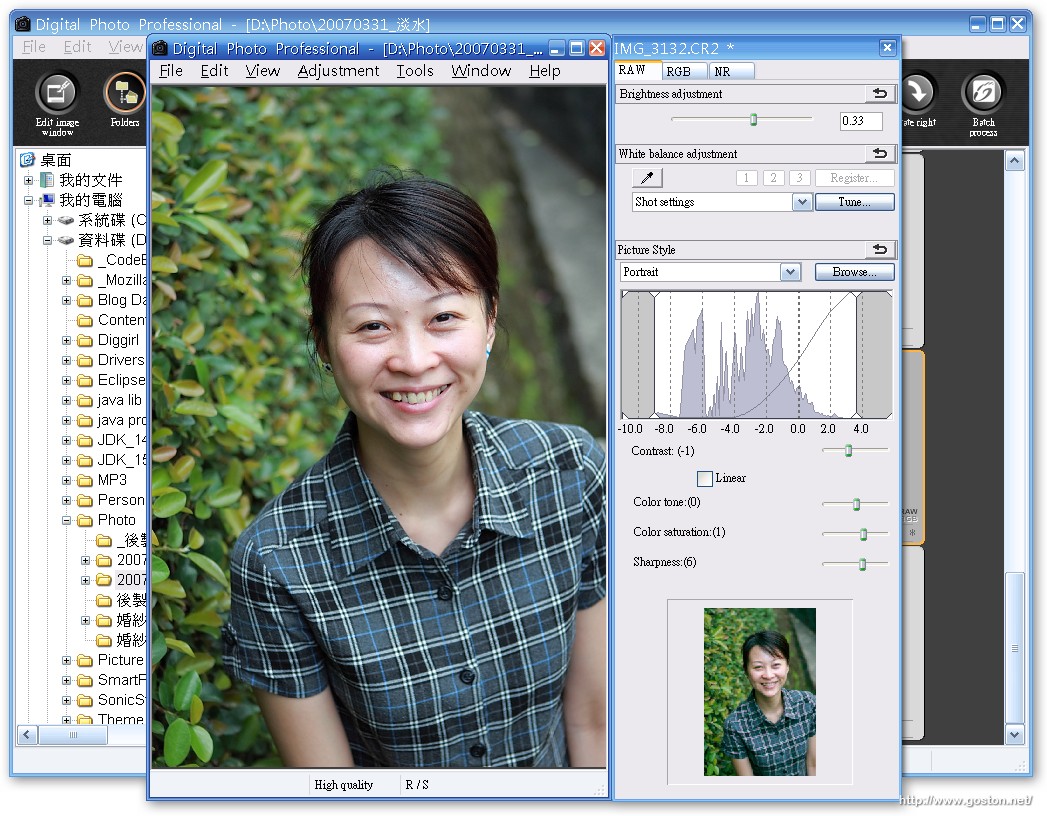
剛剛試用了一下後, 發現這個版本的 DPP 較上一版在介面上有了些許的調整, 使用起來也更加方便。

讓我們一起來看看大概有哪些變更吧!

下面是 RAW 處理頁面的選項:
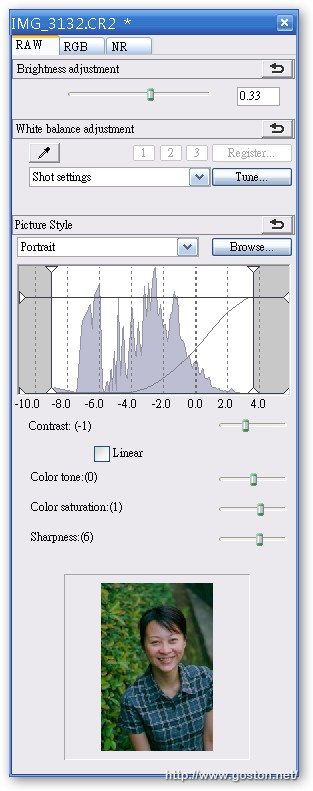
可以發現在「動態範圍」的地方有了些許的改變, 原先只能左右調整, 現在還多了上下調整。另外, 在「動態範圍」下方也多出了一項「對比」的設定; 以往要設定對比只能切到「RGB 頁面」去做調整, 現在終於能在 RAW 頁面做了。(RGB 頁面是在轉出 RAW 檔為 JPG 或 TIFF 後才會套用該頁的設定, 因此效果較差)

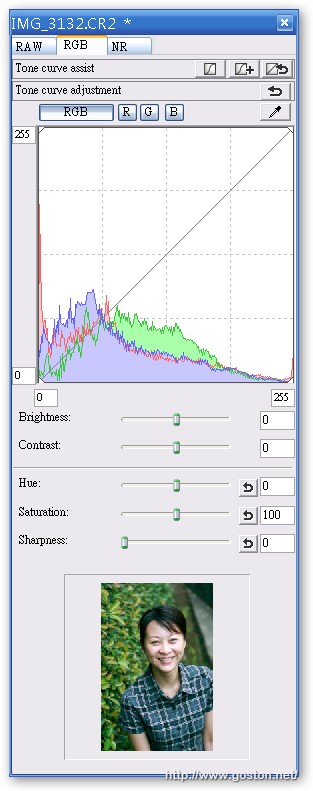
至於 RGB 頁面的選項則沒有太大的更動, 如下:
接著是新增加的 NR (雜訊消除) 頁面:
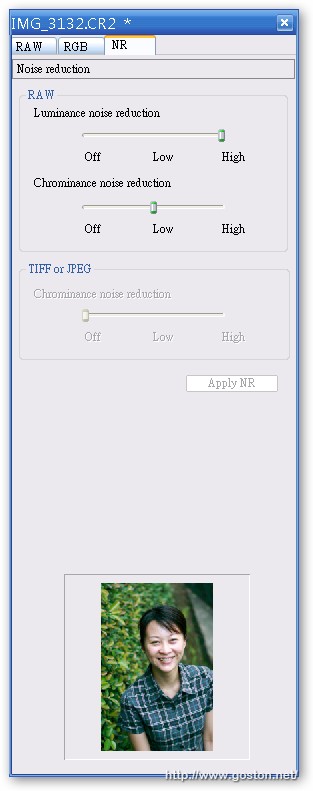
以往只能在選項設定中統一設置 NR 的參數, 現在則可以針對每張照片做不同的 NR 設定, 算是一項蠻實用的增強。

另外, 不知是不是我的錯覺, 我覺得 DPP 3.0 轉出來的檔案色彩比以前要漂亮, 特別是套用人像的 PictureStyle 後, 膚色看起來比較自然了!?

CANON DSLR 的使用者, 趕快更新你的 DPP 吧!

相關連結:

Entry Filed under: 器材及軟體心得, 攝影天地, 軟體介紹, 電腦軟體

post to del.icio.us  post to MyShare  post to HEMiDEMi  post to funP

7 Comments Add your own

  • 1. 星子  |  2007/04/06 21:29 | 回覆

    哇!好消息~~
    速去下載

    Using Mozilla Firefox Mozilla Firefox 2.0.0.3 on Windows Windows XP
  • 2. goston  |  2007/04/07 01:18 | 回覆

    @星子
    記得順便下載新版的 EOS Utility 2.0 及新版的PictureStyle回來更新, 順便刷進機身…

    DPP 3.0 用的 PictureStyle 和 2.x 版不一樣…

    Using Mozilla Firefox Mozilla Firefox 2.0.0.3 on Windows Windows Vista
  • 3. 星子  |  2007/04/07 09:49 | 回覆

    PictureStyle還得另外裝哦!
    我的是350D,機身不支援~~

    順帶一問:那郭EOS Utility的用途究竟……?
    我次次都有安裝,但從來沒使用過

    另外,我的桌上型電腦安裝新版的ZoomBrowser 5.8x圖片會無法正確顯示,只好換回舊版5.7

    Using Mozilla Firefox Mozilla Firefox 2.0.0.3 on Windows Windows XP
  • 4. 星子  |  2007/04/07 10:00 | 回覆

    真是麻煩的更新啊!
    為什麼不能一次嵌入DPP呢?
    居然得每次使用都去開啟PictureStyle檔案
    而且還有一次限用一組的限制
    這什麼設計啊!

    Using Mozilla Firefox Mozilla Firefox 2.0.0.3 on Windows Windows XP
  • 5. goston  |  2007/04/07 14:28 | 回覆

    @星子
    EOS Utility 我也沒啥在用, 不過, 它其中有項功能可以讓你用電腦控制相機來拍照…

    我也覺得 DPP 吃 PictureStyle 的設計很蠢… 最重要的是, 新版出來, 幹嘛不把現有的 PictureStyle 都包進去… -_-

    Using Mozilla Firefox Mozilla Firefox 2.0.0.3 on Windows Windows Vista
  • 6. 硬盘数据恢复  |  2007/11/16 08:59 | 回覆

    找不到了?

    Using Internet Explorer Internet Explorer 6.0 on Windows Windows XP
  • 7. 上海数据恢复  |  2007/11/16 09:08 | 回覆

    都是UPDATE的版本啊

    Using Internet Explorer Internet Explorer 6.0 on Windows Windows XP

Leave a Comment

Required

Required, hidden

Some HTML allowed:
<a href="" title=""> <abbr title=""> <acronym title=""> <b> <blockquote cite=""> <cite> <code> <del datetime=""> <em> <i> <q cite=""> <strike> <strong>

Trackback this post  |  Subscribe to the comments via RSS Feed


Donate Me

Related Posts

Recent Posts

Recent Comments