[軟體] 把視窗黏在桌面上 - Stick


2007/04/26 09:54 2,903Views


如果你在使用電腦時, 有某些檔案或目錄得經常存取、希望能追縱某些 Blog 更新的情況, 或者希望能有個能方便隨時記事的便利貼, 但卻又不想安裝肥大的 Sidebar, 那麼不妨試試「Stick」。
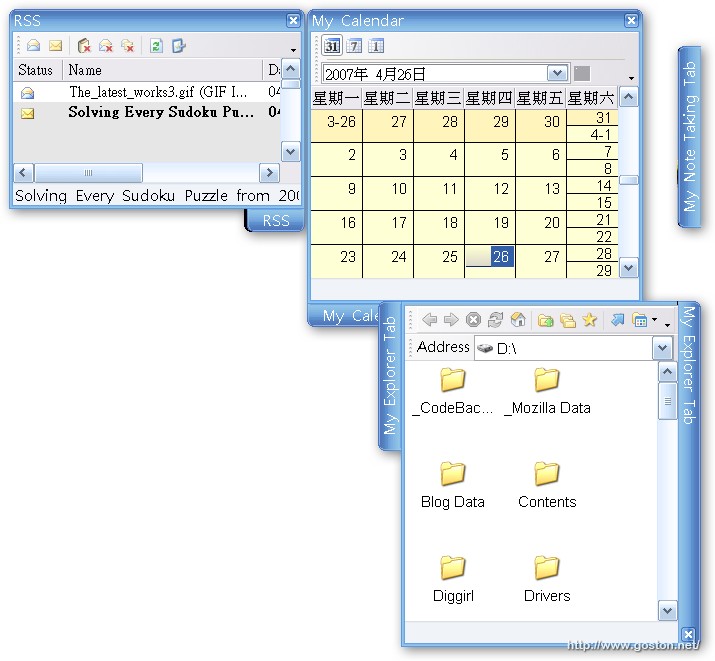
「Stick」是個很實用的軟體, 在「Stick」中你可以建立包含檔案、目錄、捷徑、RSS、瀏覽器、月曆、記事等等的 Tab (分頁), 讓你很方便的就能夠存取經常使用的服務, 並且在不用的時候還能夠捲收起來。

另外,「Stick」是免費的, 如果你想更深入了解, 可以到官方網頁取得更進一步的資訊。

相關連結:

Technorati Tags:

Entry Filed under: 軟體介紹, 電腦軟體

post to del.icio.us  post to MyShare  post to HEMiDEMi  post to funP

8 Comments Add your own

  • 1. 無法顯示網頁  |  2007/04/26 10:55 | 回覆

    這玩意兒似乎挺不錯的,
    來去官方網站逛逛,
    看看是不是符合我目前的想法~

    Using Internet Explorer Internet Explorer 7.0 on Windows Windows XP
  • 2. 異塵行者  |  2007/04/26 14:42 | 回覆

    看完站長的介紹
    尤其是那兩張預覽圖片
    馬上就被這個軟體吸引住了

    等一下就下載來試用看看
    謝謝你的推薦

    Using Mozilla Firefox Mozilla Firefox 2.0.0.3 on Windows Windows XP
  • 3. 星子  |  2007/04/26 18:24 | 回覆

    蠻酷的
    來去試用看看

    Using Mozilla Firefox Mozilla Firefox 2.0.0.3 on Windows Windows XP
  • 4. wILliAm  |  2007/04/26 20:48 | 回覆

    記事跟目錄設定的路徑中如果有中文名的話,關掉 Stick 重開,剛才設定的 tab 就會無故消失

    Using Unbranded Firefox Unbranded Firefox 2.0.0.3 on Windows Windows XP
  • 5. goston  |  2007/04/26 21:04 | 回覆

    @wILliAm
    這我倒沒發現到… 因為我目錄大都用英文命名… XD

    Using Mozilla Firefox Mozilla Firefox 2.0.0.3 on Windows Windows Vista
  • 6. Allen  |  2007/05/12 11:19 | 回覆

    常常在點選開啟程式時會出現錯誤即將關閉的訊息~~不知您是否也有類似的情況?

    Using Mozilla Firefox Mozilla Firefox 2.0.0.3 on Windows Windows XP
  • 7. goston  |  2007/05/12 18:26 | 回覆

    @Allen
    我偶爾也會出現錯誤訊息… 不過不是很常發生…

    Using Mozilla Firefox Mozilla Firefox 2.0.0.3 on Windows Windows Vista
  • 8. 挖趣 wowTree  |  2008/05/04 11:24 | 回覆

    網友將您的文章集結在:

    免費又環保的便利貼
    http://wowtree.com/tree.php?aid=134

    網路因分享而偉大,再次感謝您~
    (若有侵權或不當引用,敬請來信告知)

    Using Mozilla Firefox Mozilla Firefox 2.0.0.14 on Windows Windows XP

Leave a Comment

Required

Required, hidden

Some HTML allowed:
<a href="" title=""> <abbr title=""> <acronym title=""> <b> <blockquote cite=""> <cite> <code> <del datetime=""> <em> <i> <q cite=""> <strike> <strong>

Trackback this post  |  Subscribe to the comments via RSS Feed


Donate Me

Related Posts

Recent Posts

Recent Comments