[FF] 讓 Firefox 也有 Opera 的 SpeedDial 功能


2007/05/08 10:17 1,340Views


最近另一知名瀏覽器「Opera」在最近一版的程式中加了一個稱為「SpeedDial」的功能, 而這個方便的功能廣受使用者好評。
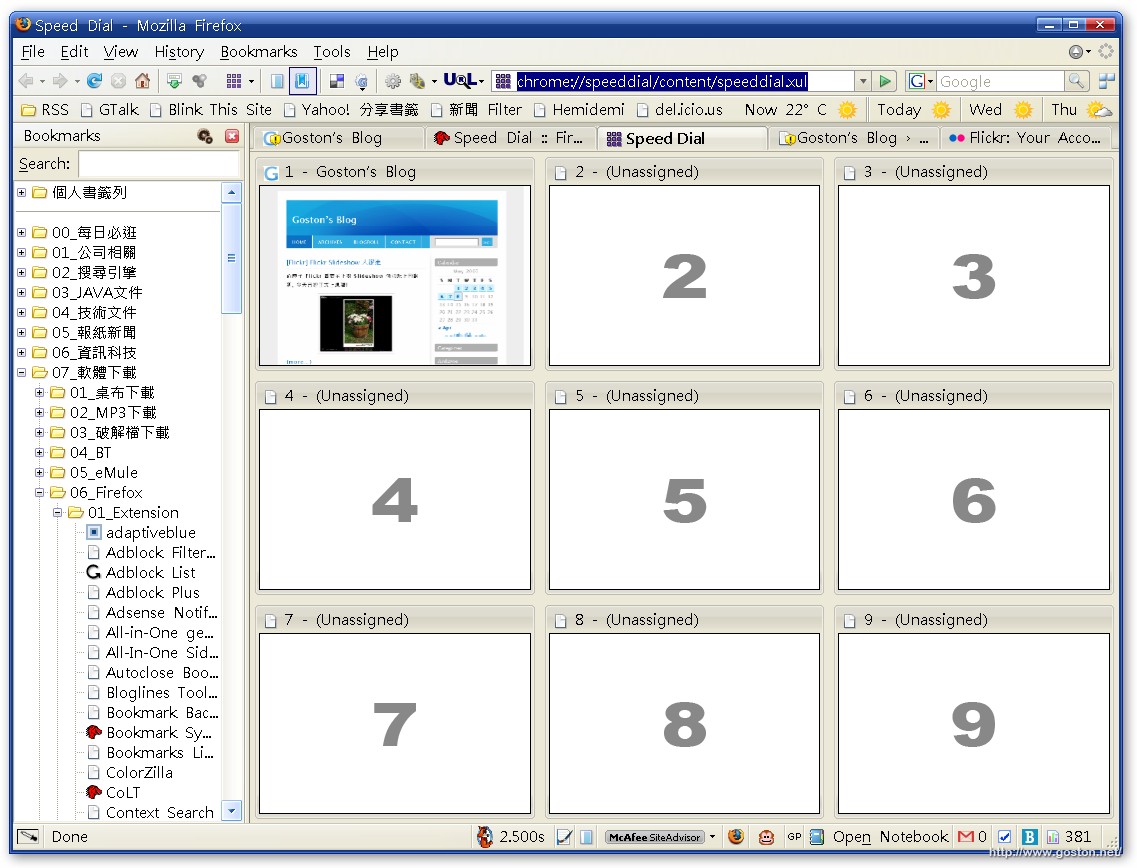
所謂的「SpeedDial」就是讓使用者將常去的網站設定一個快速鍵 (Ctrl + 1 到 9), 當使用者往後想拜訪時, 只要按下快速鍵便可直接連結。同時「SpeedDial」也提供一個類似上圖的九官格網頁縮圖, 可以直接點選連結。

如果你是 Firefox 使用者, 也很需要這個功能, 那麼「Speed Dial」擴充套件或許可以幫上忙哦!

延伸閱讀:

相關連結:

Technorati Tags: ,

Entry Filed under: 軟體介紹, 電腦軟體

post to del.icio.us  post to MyShare  post to HEMiDEMi  post to funP

3 Comments Add your own

  • 1. 壽司  |  2007/05/08 22:30 | 回覆

    我覺得上排的快速連結已經很夠用了壓XD
    還不用手去按鍵盤呢!!

    Using Mozilla Firefox Mozilla Firefox 2.0.0.3 on Windows Windows XP
  • 2. goston  |  2007/05/09 09:42 | 回覆

    @壽司
    我那一排都被 Bookmarklet 佔滿了, 而且你把 SpeedDial 拉到工具列上, 也可以不用手按鍵盤就能連結了啊…

    Using Mozilla Firefox Mozilla Firefox 2.0.0.3 on Windows Windows XP
  • 3. MilchFlasche  |  2007/05/10 19:43 | 回覆

    之前聽說Opera有speed dial,就很想找找Firefox有沒有移植的套件,現在終於有了:)

    Using Mozilla Firefox Mozilla Firefox 2.0.0.2 on Windows Windows XP

Leave a Comment

Required

Required, hidden

Some HTML allowed:
<a href="" title=""> <abbr title=""> <acronym title=""> <b> <blockquote cite=""> <cite> <code> <del datetime=""> <em> <i> <q cite=""> <strike> <strong>

Trackback this post  |  Subscribe to the comments via RSS Feed


Donate Me

Related Posts

Recent Posts

Recent Comments