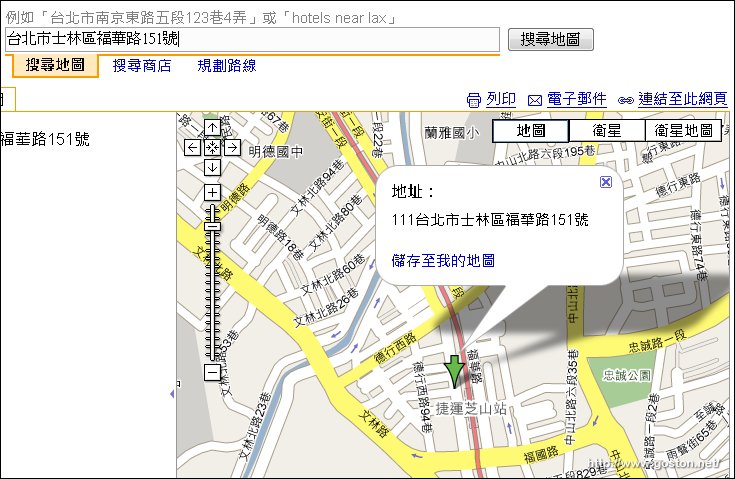
[資訊] Google Maps 支援台灣門牌搜尋


2007/06/30 23:05 1,789Views


剛剛發現的, 繼台灣圖資後「Google Maps」現在也能找門牌啦!

上圖是我很愛去的芝山站附近某知名相機店家, 標示的位置看起來還蠻正確的!

Technorati Tags: ,

Entry Filed under: 網際網路, 資訊新知, 資訊科技

post to del.icio.us  post to MyShare  post to HEMiDEMi  post to funP

12 Comments Add your own

  • 1. 異塵行者  |  2007/06/30 23:18 | 回覆

    真的是一個好消息!如此一來Google Map對我的實用性又大大提升了!

    Using Mozilla Firefox Mozilla Firefox 2.0.0.4 on Windows Windows XP
  • 2. vicyfaye  |  2007/07/01 11:00 | 回覆

    請問大大知道查詢到地址之後,要如何查詢該地址的GPS座標嗎?
    謝謝告知這個好消息! ^^

    Using Internet Explorer Internet Explorer 6.0 on Windows Windows XP
  • 3. goston  |  2007/07/01 11:32 | 回覆

    @vicyfaye
    地圖右上角, 連結至此網頁的位址會包含 GPS 座標資訊…

    Using Mozilla Firefox Mozilla Firefox 2.0.0.4 on Windows Windows XP
  • 4. Ramius  |  2007/07/01 21:11 | 回覆

    剛才玩一下發現,原本一片空白的大陸,現在也開始出現簡單的地圖了

    Using Internet Explorer Internet Explorer 6.0 on Windows Windows XP
  • 5. goston  |  2007/07/01 21:32 | 回覆

    @Ramius
    Nice 哦!

    Using Mozilla Firefox Mozilla Firefox 2.0.0.4 on Windows Windows XP
  • 6. Ramius  |  2007/07/01 22:12 | 回覆

    再玩一下台灣的地圖又發現一些怪地方,比如說全台灣的機場都沒有中文名字,只標英文,但卻連英文”Airport”都不會有,可是用搜尋卻還是找得到,而且機場在衛星地圖模式下是會被遮住的。此外佳山基地甚至沒有在地圖上出現,兩條跑道之間的連絡道都不見了,倒是中間的住宅巷弄卻很清楚,難道是軍事上的考量嗎?可是衛星圖的露餡了,真不懂在想甚麼…

    另外不知道是不是Google怕扯上政治,中正紀念堂是完全沒有標示的…

    Using Internet Explorer Internet Explorer 6.0 on Windows Windows XP
  • 7. goston  |  2007/07/01 23:30 | 回覆

    @Ramius
    聽說門牌資訊是來自蕃薯藤的 MyMap…!?

    Using Mozilla Firefox Mozilla Firefox 2.0.0.4 on Windows Windows XP
  • 8. 走過的、學過的、&hellip  |  2007/07/12 15:34 | 回覆

    [ 網路 ] Google Maps 增加新的服務內容…

    Google Maps 的服務內容越來越多樣化了,自從前一陣子將台灣地理資訊再昇級後(見連結 1,連結 2),最近透過 Mapplets 技術的演進,在 Google Maps 上面又提供了一些新的訊息查詢服務。
    連進 Goog…

    Using WordPress WordPress 2.2.1
  • 9. clin  |  2008/07/30 22:27 | 回覆

    你好
    我想請問你
    要怎樣才能網頁的字型像你的這麼漂亮
    可以告訴我嗎
    謝謝

    Using Internet Explorer Internet Explorer 6.0 on Windows Windows XP
  • 10. goston  |  2008/07/31 09:36 | 回覆

    @clin
    這篇文章中的圖片字型是微軟正黑體, 只要用該字體即可…

    Using Mozilla Firefox Mozilla Firefox 3.0.1 on Windows Windows XP
  • 11. clin  |  2008/07/31 19:53 | 回覆

    Re:

    @goston:

    @clin
    這篇文章中的圖片字型是微軟正黑體, 只要用該字體即可…

    我沒有微軟正黑體,就用 MS PGothic,CSS改成這樣

    結果在ie看起來還是細明體,在firefox看起來是黑體字?…….
    1. 請問是這樣改嗎
    2. 我必須灌vista的微軟正黑體嗎
    謝謝你

    Using Internet Explorer Internet Explorer 6.0 on Windows Windows XP
  • 12. clin  |  2008/07/31 19:56 | 回覆

    Variable name=”postTitleFont” description=”Post Title Font”
    type=”font”
    default=”normal bold 180% Verdana, MS PGothic”
    value=”normal bold 158% Verdana, MS PGothic”

    Using Internet Explorer Internet Explorer 6.0 on Windows Windows XP

Leave a Comment

Required

Required, hidden

Some HTML allowed:
<a href="" title=""> <abbr title=""> <acronym title=""> <b> <blockquote cite=""> <cite> <code> <del datetime=""> <em> <i> <q cite=""> <strike> <strong>

Trackback this post  |  Subscribe to the comments via RSS Feed


Donate Me

Related Posts

Recent Posts

Recent Comments