[FF] 隨時存取你的 iGoogle 小工具 - iGoogle Sidebar


2007/08/01 22:54 1,621Views


如果你是「iGoogle」個人化首頁的愛用者, 也很喜歡 iGoogle 上各式各樣的小工具, 那就不該錯過「iGoogle Sidebar」這個「Firefox」擴充套件。

顧名思義,「iGoogle Sidebar」是個能讓使用者隨時存取放在 iGoogle 上各式小工具的擴充套件。安裝好「iGoogle Sidebar」後, 點選工具列上的「G」圖示, 立刻就會「生出」一個放有 iGoogle 小工具的 Sidebar:
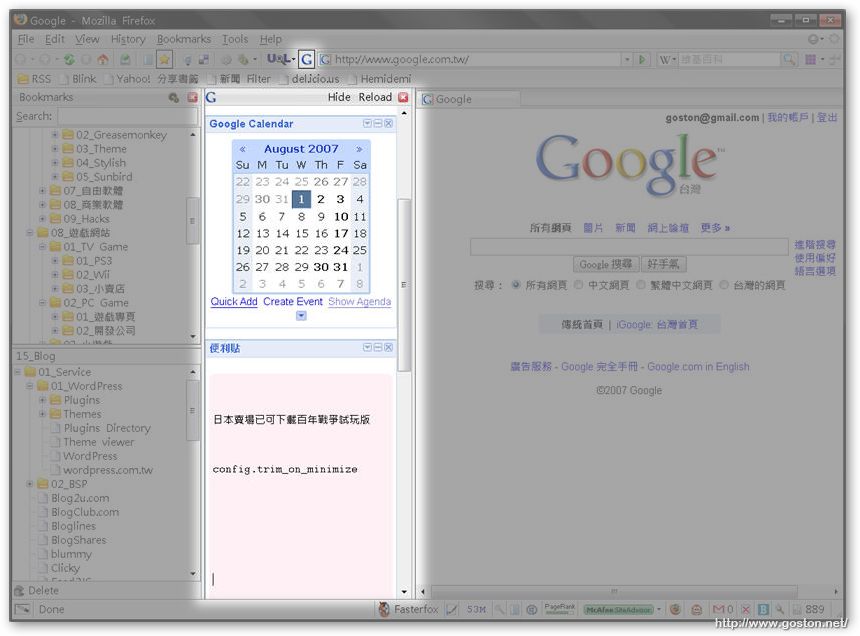
如此一來, 不管是在瀏覽什麼網頁, 都不用再另外開分頁就能隨時使用放在 iGoogle 上的小工具啦!

相關連結:

Technorati Tags: ,

Entry Filed under: 軟體介紹, 電腦軟體

post to del.icio.us  post to MyShare  post to HEMiDEMi  post to funP

1 Comment Add your own

  • 1. 花水木 HANAMITSUKI&hellip  |  2007/09/09 00:23 | 回覆

    卸下心防,終於開始用iGoogle…

      一直最喜歡的Google產品就是Gmail和Google Reader。之前曾經想說嘗試使用iGoogle,想說多支持一下Google的產品,可是實在很難用。而且上星期開始(或更早開始),本來點RSS的「訂閱到Google Reader….

    Using WordPress WordPress 2.2.1

Leave a Comment

Required

Required, hidden

Some HTML allowed:
<a href="" title=""> <abbr title=""> <acronym title=""> <b> <blockquote cite=""> <cite> <code> <del datetime=""> <em> <i> <q cite=""> <strike> <strong>

Trackback this post  |  Subscribe to the comments via RSS Feed


Donate Me

Related Posts

Recent Posts

Recent Comments