[資訊] 內嵌 Google Maps 到自己的 Blog


2007/08/22 10:41 1,816Views

雖然我很早就透過 Plugin 在 Blog 上內嵌 Google 地圖了 (範例), 但看到「Google Maps」現在主動提供內嵌語法還是相當高興。

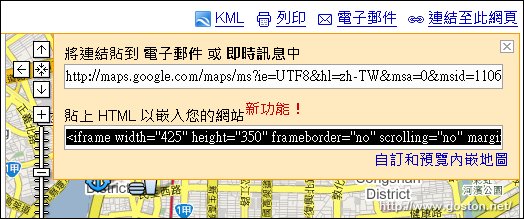
只要按下頁面上的「連結至此網頁」就可以得到內嵌語法了:
下面是我製作的 Google 地圖, 使用 Google 提供的語法內嵌的範例:


檢視較大的地圖

Technorati Tags:

Entry Filed under: 網際網路, 資訊新知, 資訊科技

post to del.icio.us  post to MyShare  post to HEMiDEMi  post to funP

5 Comments Add your own

  • 1. 阿祥祥  |  2007/08/22 13:16 | 回覆

    謝謝,
    但我也有引用, 卻沒看到我自己 My Map 標示的圖示 >

    Using Internet Explorer Internet Explorer 7.0 on Windows Windows Server 2003
  • 2. 星子  |  2007/08/22 13:43 | 回覆

    真是好消息!
    這樣方便多了!

    PS. 經使用過CCleaner後,我的GMap終於回覆正常了(泣)

    Using Mozilla Firefox Mozilla Firefox 2.0.0.6 on Windows Windows XP
  • 3. goston  |  2007/08/22 13:48 | 回覆

    @星子
    所以你之前 GMap 不能用是因為暫存檔的關係!? @_@a

    Using Mozilla Firefox Mozilla Firefox 2.0.0.6 on Windows Windows XP
  • 4. hotday  |  2007/08/22 22:54 | 回覆

    不錯說…和urmap有拼…

    但是在規劃路線方面 urmap 略勝一籌

    對我這個不開車也不騎車的人來說

    urmap 可以提供搭乘大眾運輸或是坐公車的方案給我參考

    雖然不是去每個地方都可以給我最快的方案

    至少有一份不會偏差太遠的路線

    Using Mozilla Firefox Mozilla Firefox 2.0.0.6 on Windows Windows XP
  • 5. goston  |  2007/08/22 23:00 | 回覆

    @hotday
    urmap 的路徑規畫功能的確不錯, 不過有時也會腦殘秀逗就是… XD

    Using Mozilla Firefox Mozilla Firefox 2.0.0.6 on Windows Windows XP

Leave a Comment

Required

Required, hidden

Some HTML allowed:
<a href="" title=""> <abbr title=""> <acronym title=""> <b> <blockquote cite=""> <cite> <code> <del datetime=""> <em> <i> <q cite=""> <strike> <strong>

Trackback this post  |  Subscribe to the comments via RSS Feed


Donate Me

Related Posts

Recent Posts

Recent Comments