[軟體] 讓 XP 也能有 Vista 的 Flip 3D 特效


2007/09/27 09:34 10,474Views

在「電腦玩物看到的實用軟體…

話說, 在 Vista 上有個微軟大吹特吹、每逢展示必 Demo 的視窗切換特效稱做「Flip 3D」:

雖然這個特效被許多人譏為無三小路用, 但還是有不少人因為這個美麗的特效從 XP 投往 Vista 的懷抱。

然而, 從現在起那些擁抱 Vista 的人又會更幹啦! 因為這個特效在 XP 上也有了!

透過「Shock Aero」這套軟體, 讓你在 XP 下也能玩「Flip 3D」。

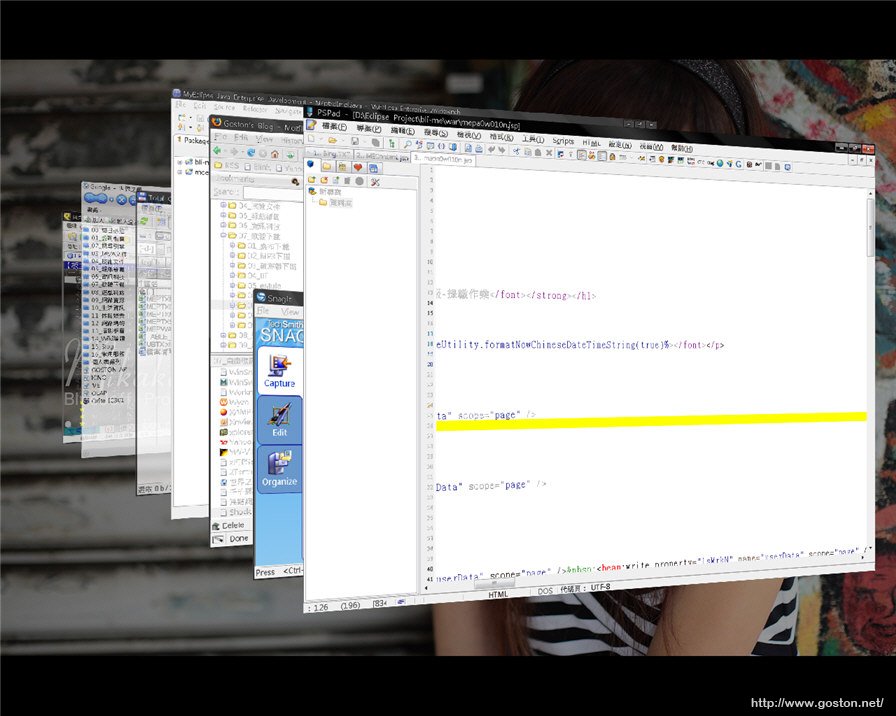
安裝完程式後, 只要按下「Win」+「Tab」鍵, 就能利用「Flip 3D」來切換視窗; 雖然整體的效果不若 Vista 華麗, 但至少也有三分樣了:
不止如此,「Shock Aero」更提供了類似 MAC OS 上面的「Expose」視窗切換方式, 將開啟的視窗攤開來讓使用者進行切換:
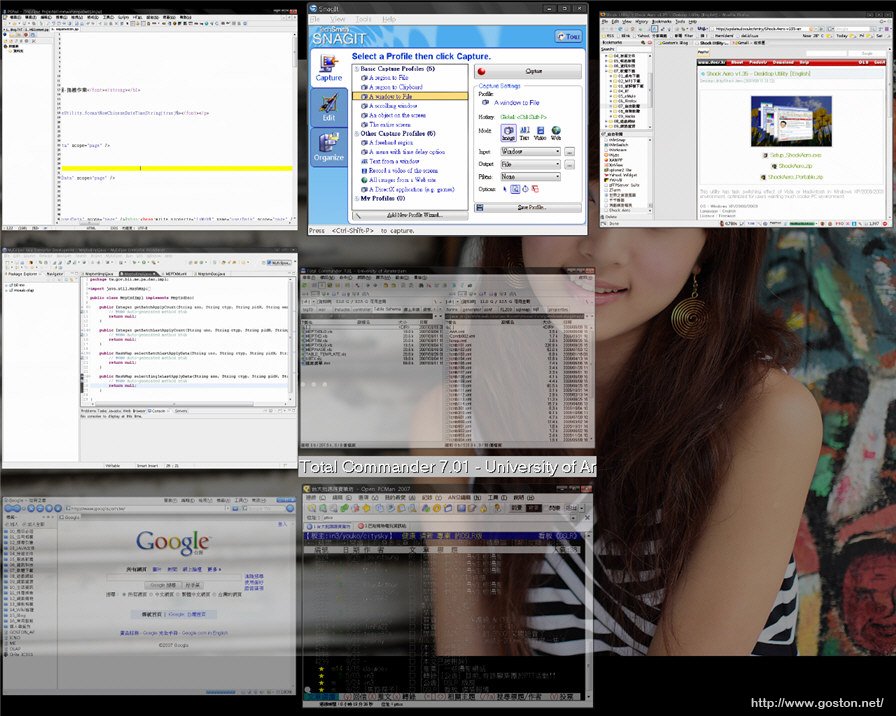
很明顯的「Expose」的實用性比「Flip 3D」大多了, 個人也是建議設定為這種方式來進行切換。

最後, Vista 吸引人的特效正逐漸被搬到 XP, 我 Vista 是買心酸的嗎?

2007.09.29 補充: 另一套更棒的軟體「Winflip」, 有興趣的可看「電腦玩物」的介紹

相關連結:

Technorati Tags: , , ,

Entry Filed under: 軟體介紹, 電腦軟體

post to del.icio.us  post to MyShare  post to HEMiDEMi  post to funP

8 Comments Add your own

  • 1. Bryan  |  2007/09/27 11:16 | 回覆

    沒錯,我有聞到酸味 XD

    Using Mozilla Firefox Mozilla Firefox 2.0.0.7 on Windows Windows XP
  • 2. 好手  |  2007/09/28 01:30 | 回覆

    我對Flip 3D實在沒什麼興趣,看幾次就覺得稀疏平常了…不過我對Goston的桌布倒是比較有興趣耶:P

    不知道有沒有機會來介紹一下給大家

    Using Mozilla Firefox Mozilla Firefox 2.0.0.6 on Windows Windows Server 2003
  • 3. tina  |  2007/09/28 08:14 | 回覆

    「Win」+「Tab」鍵,
    請問win鍵是那一個 ? 小白的問題

    Using Internet Explorer Internet Explorer 7.0 on Windows Windows XP
  • 4. goston  |  2007/09/28 09:06 | 回覆

    @好手
    我的桌布是由 bluejeff 所拍攝的作品, Model 則是國內外拍界相當有名的 果子 (Mikako), 也是我目前除了老婆外, 最想拍攝的女生哦!

    @tina
    鍵盤上有個微軟旗子標誌的按鍵…

    Using Mozilla Firefox Mozilla Firefox 2.0.0.7 on Windows Windows XP
  • 5. appleseed  |  2007/09/28 21:20 | 回覆

    @@!

    微軟開發了那麼久的界面居然XP也能跑喔~
    這真是情何以堪阿~T_T

    Using Mozilla Firefox Mozilla Firefox 2.0.0.7 on Mac OS Mac OS X
  • 6. chinson  |  2007/09/29 15:42 | 回覆

    是很心酸啊…囧

    Using Mozilla Firefox Mozilla Firefox 2.0.0.7 on Windows Windows Vista
  • 7. Rolenzo  |  2007/10/03 22:22 | 回覆

    在 Vista 出來很久以前,
    就有 Modotate 這種 3D
    桌面特效軟體了。

    Using Mozilla Firefox Mozilla Firefox 2.0.0.1 on Windows Windows XP
  • 8. ROCK  |  2007/10/06 23:08 | 回覆

    NO

    Using Internet Explorer Internet Explorer 6.0 on Windows Windows XP

Leave a Comment

Required

Required, hidden

Some HTML allowed:
<a href="" title=""> <abbr title=""> <acronym title=""> <b> <blockquote cite=""> <cite> <code> <del datetime=""> <em> <i> <q cite=""> <strike> <strong>

Trackback this post  |  Subscribe to the comments via RSS Feed


Donate Me

Related Posts

Recent Posts

Recent Comments