[軟體] 超強 Windows 字型美化軟體 - GDI++


2007/10/19 14:23 48,866Views


Windows 的使用者一定都很羨慕 MAC 使用者有美美又高質感的字型可用吧!? 現在透過「GDI++」, 就能讓你也能在 Windows 上看到類似 MAC 的美麗字型囉!

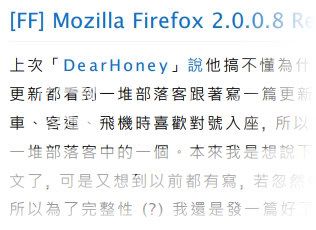
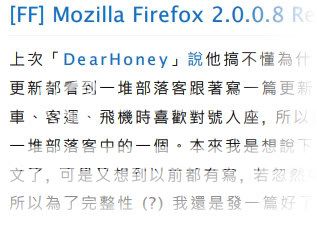
為了方便各位比較使用前後的差異, 我利用同一種字型分別透過 Windows 內建的「ClearType」和「GDI++」美化, 並截取了圖片讓各位比較。

首先看到的是「ClearType」:
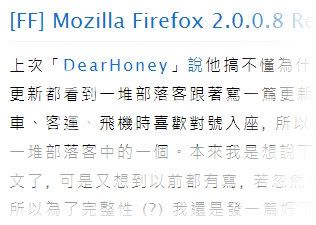
接著是「GDI++」, 並利用「GDI++」將字型粗細設為「細」:
用「GDI++」將字型粗細設為「中」:
用「GDI++」將字型粗細設為「寬」:
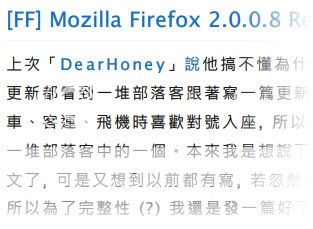
如何!? 不管是哪一種粗細, 看起來是不是都比「ClearType」要好看許多呢!? 如果你有興趣的話, 不妨下載來使用。

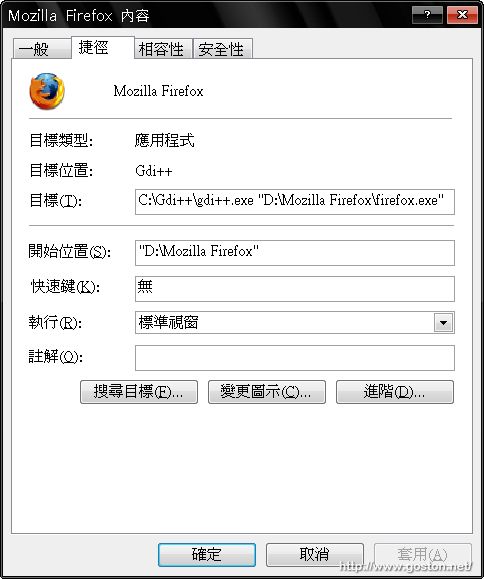
補充: 如果你希望 GDI++ 的效果只套用到特定程式而非整個系統的話, 可以建一個捷徑並設定用 GDI++ 開啟該程式的執行檔, 如下:
另外, 下面轉貼 PTT BBS「delphinus」網友的詳細介紹文:

 作者  delphinus (清遠閑放超然於塵垢之外)         看板  EZsoft
 標題  [免費] Gdi++ Windows 下字形美化軟體
 時間  Fri Oct 19 13:45:37 2007
───────────────────────────────────────
大家好,

如果您覺得 Windows 下的字很醜,可以試試這軟體。

**官網**
http://drwatson.nobody.jp/gdi++/
但很久沒在維護了。目前是一些有心人繼續發展,網頁如下。
http://www18.atwiki.jp/gdiplus2/

**網頁效果**
http://img73.imageshack.us/img73/2955/20071007165114cu9.png
http://img122.imageshack.us/img122/9132/20071007165136xd4.png
http://img524.imageshack.us/img524/9584/20071007165349cz0.png
http://img507.imageshack.us/img507/6209/20071007171621xe7.png
最後二張是同網頁,只是字體的顏色可以調整(第二張比較黑)。
**下載**
http://www.sendspace.com/file/ugit9x

**重要!**
此版本只合適 SSE2 以上的 CPU,使用 SSE 者請將 gdi++_sse.dll/
gdi++_sse.exe 改為 gdi++.dll/gdi++.exe。

**執行方式**
執行 gditray.exe 馬上看到結果,不滿意也可馬上移除。記得,路徑不要
有空白! 使用GDI++後,cleartype就沒作用了,直接由 gdi++ 取代。

**內建三種設定效果**
其中提供三種粗中細效果的設定檔,以下為效果圖,由左至右分別為無、輕、
中與重。

http://img99.imageshack.us/img99/719/gdixv8.png

**指定某些程式不處理**
如果會當機有可能是某些程式不相容,可以將這些程式的"檔名" (ex:abc.exe)
寫到 ini 中的 [ExcludeModule],表示不使用 GDI++。

不過以gdi++的特性,因為計算字型的時間比較長,所以畫面更新速度會被拖慢。
對於需要快速移動文字的程式,一定要避開,不然 gdi++ 有可能會因為來不急
畫而當機。(視 CPU 速度而定)

如果您很多程式都會與gdi++發生衝突,就不需要使用gditray這種全域作用
的方式,而是將想用的程式拖至gdi++.exe(或自行寫batch檔)等方式。

**指定某些字體不處理**
另外,GDI++對某些字效果反而比較差,可以將這些字的"名稱" 寫到 [Exclude]
中,這樣 GDI++ 就不會處理這些字型。一般來說,使用黑體的效果是最好的,
明體最差。

**字形取代**
另外內建的明體與楷書用gdi++效果都不佳,還好gdi++提供取代方式,可在
[FontSubstitutes] 下面加入

[FontSubstitutes]
標楷體=xxx楷書
新細明體=xxx明體
細明體=xxx明體

後面是取代的字型名稱。當然要換成其它字體也行,由您決定!

**GDI++ 與 ClearType 效果差異**
想了解 GDI++ 與 ClearType 有何不同,可各別使用,然後抓圖放大比較。
GDI++    : http://img228.imageshack.us/img228/6533/20071008005157we8.png
ClearType: http://img186.imageshack.us/img186/2197/20071008005204uu6.png

這就是為何使用 GDI++ 的結果與 MAC 非常接近。

- Delphinus

延伸閱讀:

相關連結:

Technorati Tags: , ,

Entry Filed under: 軟體介紹, 電腦軟體

post to del.icio.us  post to MyShare  post to HEMiDEMi  post to funP

34 Comments Add your own

  • 1. Kaie  |  2007/10/19 16:16 | 回覆

    真的好強、好快、好厲害…啟用後,突然間讓人誤以為,Mac怎麼會出了個醜醜的Windows Theme…囧..推薦!!

    Using Mozilla Firefox Mozilla Firefox 2.0.0.8 on Windows Windows XP
  • 2. goston  |  2007/10/19 16:44 | 回覆

    @Kaie
    它的微調功能很多, 如果細心調整的話, 我認為可以調到不輸 MAC 的顯示效果哦!

    Using Mozilla Firefox Mozilla Firefox 2.0.0.8 on Windows Windows XP
  • 3. star  |  2007/10/19 21:26 | 回覆

    好用耶 大推

    Using Internet Explorer Internet Explorer 6.0 on Windows Windows XP
  • 4. Kaie  |  2007/10/19 21:54 | 回覆

    對呀…很多Detail可以調,囧…目前就是搭配Mac的儷黑體,超正點..後來又是請教一下Google大師之後,發現對岸同胞這篇說明 http://0rz.tw/093es ,有給他詳細到。那個論談玩弄字型的程度,有牛唷…Cool

    Using Mozilla Firefox Mozilla Firefox 2.0.0.8 on Windows Windows XP
  • 5. goston  |  2007/10/19 22:25 | 回覆

    @Kaie
    感謝提供, 我把文章中的「GDI++ 設定教學」的連結改為您提供的這篇了…

    Using Mozilla Firefox Mozilla Firefox 2.0.0.8 on Windows Windows XP
  • 6. shizo  |  2007/10/19 23:39 | 回覆

    我有木眼,除了GDI寬有比較明顯不同之外,其他的我看不出有差別耶,呵呵^^”

    Using Safari Safari 419.3 on Mac OS Mac OS X
  • 7. goston  |  2007/10/19 23:41 | 回覆

    @shizo
    這是我剛裝完 GDI++ 時所抓的圖, 其實 GDI++ 有很多微調項目可調, 可以調的很漂亮哦… 這是我後來微調的成果 點此

    Using Mozilla Firefox Mozilla Firefox 2.0.0.8 on Windows Windows XP
  • 8. Viewfinder  |  2007/10/20 10:47 | 回覆

    微軟也有Clear Type Tuner Power Toy
    安裝後也可以微調字型的粗細
    把字型變粗之後
    感覺好很多

    Using Mozilla Firefox Mozilla Firefox 2.0.0.8 on Windows Windows XP
  • 9. goston  |  2007/10/20 16:03 | 回覆

    @Viewfinder
    微軟的那個我有裝, 可惜它能微調的項目就那幾個, 沒有比 GDI++ 有彈性…

    Using Mozilla Firefox Mozilla Firefox 2.0.0.8 on Windows Windows XP
  • 10. Windows 字型美化軟&hellip  |  2007/10/21 04:38 | 回覆

    [...] 在 Goston 那邊看到的字型美化軟體 (其實他是從 Ptt 上看到的 XD):[軟體] 超強 Windows 字型美化軟體 - GDI++。 [...]

    Using WordPress WordPress 2.3
  • 11. bias  |  2007/10/21 18:33 | 回覆

    雖然看了文章底下延伸閱讀的設定教學還是霧煞煞,有點超出我的理解範圍,亂試又試不出個所以然來,請問已經對自己微調效果很滿意的大大們願意分享一下妳們在 gdi++.ini 的完整設定嗎?

    Using Mozilla Firefox Mozilla Firefox 1.5.0.12 on Windows Windows XP
  • 12. alicekey  |  2007/10/27 12:11 | 回覆

    好歹也是在EZsoft看到的,也幫人家打個廣告嘛~。

    Using Mozilla Firefox Mozilla Firefox 2.0.0.8 on Mac OS Mac OS X
  • 13. william  |  2007/10/27 18:43 | 回覆

    有些字型是換不到的 …………….

    Using Mozilla Firefox Mozilla Firefox 2.0.0.7 on Windows Windows XP
  • 14. goston  |  2007/10/27 20:39 | 回覆

    @alicekey
    有啊… 我不是有把 EZsoft 的文章轉載過來了嗎?

    Using Mozilla Firefox Mozilla Firefox 2.0.0.8 on Windows Windows XP
  • 15. adrianmak  |  2007/11/03 06:51 | 回覆

    輸入中文時的選字地方會變成這樣子,如何解決?

    http://i108.photobucket.com/albums/n16/adrianmak/Snap1-121.jpg

    Using Mozilla Firefox Mozilla Firefox 2.0.0.9 on Windows Windows XP
  • 16. EarlEco  |  2007/11/13 15:38 | 回覆

    @goston

    http://img155.imageshack.us/img155/6728/testba9.jpg
    圖中,加上ForceChangeFont=LiHei Pro,”執行”的那個,如果不用強迫載入,也可
    以將字體改為儷黑體?因為只要一用到ForceChangeFont,韓文網頁就變亂碼了。
    特此請教,謝謝。

    Using Internet Explorer Internet Explorer 6.0 on Windows Windows XP
  • 17. goston  |  2007/11/13 16:20 | 回覆

    @EarlEco
    FontSubstitutes 可以指定只針對特定語系進行字體轉換…

    Using Mozilla Firefox Mozilla Firefox 2.0.0.9 on Windows Windows XP
  • 18. [...]&hellip  |  2007/11/27 02:37 | 回覆

    測試修改系統預設字型…

    Windows 作業系統一直到 XP 都是使用新細明體做為系統預設字型,新細明體的優點,是在小字型時以點…

    Using WordPress WordPress 2.3.1
  • 19. ggboy  |  2007/11/27 18:55 | 回覆

    **輸入中文時的選字地方的解決方法**

    http://forum.hkgolden.com/view.asp?message=1059651

    Using Internet Explorer Internet Explorer 7.0 on Windows Windows Vista
  • 20. GDI++ Helium 版 at wILli&hellip  |  2007/12/22 22:14 | 回覆

    [...] Goston 那邊看到在介紹字型美化軟體:GDI++ [...]

    Using WordPress WordPress 2.2.2
  • 21. marlboro  |  2007/12/29 18:17 | 回覆

    注音輸入法選字的問題有解嗎??
    ggboy貼的聯結並沒有提到這點ㄚ

    Using Mozilla Firefox Mozilla Firefox 2.0.0.11 on Windows Windows XP
  • 22. keigowei  |  2008/01/28 21:14 | 回覆

    您好,藉此版面一問,請問您網站上的小圖按下後,會運用Flash的方式在原頁上放大圖片,請問這是怎麼辦到的呢?方不方便透露一下呢?最近在好多網站上看到這樣的效果,可是一直不知道技巧,麻煩指導一下囉!謝謝!

    Using Mozilla Firefox Mozilla Firefox 2.0.0.11 on Windows Windows XP
  • 23. goston  |  2008/01/28 21:40 | 回覆

    @keigowei
    Google “Lightbox” 就可以找到…

    Using Mozilla Firefox Mozilla Firefox 2.0.0.11 on Windows Windows XP
  • 24. George  |  2008/01/30 21:13 | 回覆

    讚!

    怎麼那麼多人用Firefox =.=
    難道用ie會被Ban?
    不會吧..

    Using Mozilla Firefox Mozilla Firefox 3.0b2 on Windows Windows XP
  • 25. goston  |  2008/01/31 11:31 | 回覆

    @George
    用 IE 不會被 Ban 啦, 只是因為本站的性質, 所以用 Firefox 的人似乎比較多… :D

    Using Mozilla Firefox Mozilla Firefox 2.0.0.11 on Windows Windows XP
  • 26. Cybaster  |  2008/02/06 16:24 | 回覆

    請問一下有關 GDI++.ini 設定的問題:

    為何我設定參數【FontLink】完全沒有作用?
    ****************************
    FontLoader=0
    FontLink=1
    FontSubstitutes=1

    【FontLink】
    華康儷中黑 = LiHei Pro, DFKGothic-Md, DFPGothicP-W5, “華康中黑體(P)-UN”, Arial Unicode MS

    [FontSubstitutes]
    Tahoma = 華康儷中黑

    ****************************
    字型會替換,可缺字不會補,難道 FontLink 不是拿來補字用的?

    PS:順便補充,我的登錄檔中不像一般網路上的設定,比如:

    HKEY_LOCAL_MACHINE\SOFTWARE\Microsoft\Windows NT\CurrentVersion\[color=#FF0000]FontLink\SystemLink[/color]

    紅字的部份就是我的登錄檔所沒有的,會不會與這有關係?我的系統是用 XP SP2

    Using Internet Explorer Internet Explorer 7.0 on Windows Windows XP
  • 27. Wallace  |  2008/03/01 00:29 | 回覆

    小弟原本用 ClearType + 微軟正黑體字型,後來看到這篇及另一篇有提供 gditray 的中文化工具,就試用了一下,執行後發覺看起來反而變得更模糊且字的邊緣有暈開現象,所以就關掉相關程式,但不知道是不是錯覺,好像雖然已關掉 GDI++ 的程式了,卻好像已不是原本所調校過的 ClearType 的感覺。

    請問 GDI++ 會改到 OS 的設定嗎? 不使用只要關掉及刪除就可以了嗎? 謝謝先。

    Using Unbranded Firefox Unbranded Firefox 2.0.0.12 on Windows Windows XP
  • 28. goston  |  2008/03/01 00:51 | 回覆

    @Wallace

    @goston:

    請問 GDI++ 會改到 OS 的設定嗎? 不使用只要關掉及刪除就可以了嗎? 謝謝先。

    不會改到, 另外會看起來更糊及暈開大多都是因為參數沒調整到最佳化…

    Using Mozilla Firefox Mozilla Firefox 2.0.0.12 on Windows Windows Vista
  • 29. 夜影  |  2008/06/17 17:30 | 回覆

    大大救命啊><
    用了以後中文都變成亂碼= =
    英文雖然看起來都很漂亮可是中文就死很慘….
    有辦法調嗎!?

    Using Mozilla Firefox Mozilla Firefox 2.0.0.14 on Windows Windows XP
  • 30. goston  |  2008/06/17 17:33 | 回覆

    @夜影:

    大大救命啊><
    用了以後中文都變成亂碼= =
    英文雖然看起來都很漂亮可是中文就死很慘….
    有辦法調嗎!?

    如果你是細明體或新細明體, 那就將這兩個字型設為排除在 GDI++ 的效果外, 不然就換個字型…

    Using Mozilla Firefox Mozilla Firefox 3.0 on Windows Windows XP
  • 31. 夜影  |  2008/06/17 21:50 | 回覆

    @goston

    請問大大有沒有更新的GDI++ 的延伸教學? 我進不去你提供的載點喔@@

    Using Mozilla Firefox Mozilla Firefox 2.0.0.14 on Windows Windows XP
  • 32. Robert  |  2008/08/12 17:48 | 回覆

    感謝您的分享, 今天我試了之後, 字有點淡, 後來使用 gdi0870.zip 的He: Light/LCD-RGB/Sat+8
    之後, 字感覺比較黑. 看起來更清楚. 不知為什…

    又試了 cwttf 的圓體, 感覺很清爽, 但是淡了點, 不知道如何調…

    非常感謝你的分享 ^_^

    Using Mozilla Firefox Mozilla Firefox 3.0.1 on Windows Windows XP
  • 33. goston  |  2008/08/12 20:31 | 回覆

    @Robert
    我目前的參數如下:

    
    [General]
    Name=中
    Icon=..\gditrayicon.icl,3
    
    HookChildProcesses=0
    HintingMode=2
    AntiAliasMode=1
    MaxHeight=150
    FontLoader=0
    FontSubstitutes=2
    GammaMode=-1
    GammaValue=1.8
    RenderWeight=1.6
    Contrast=2.2
    TextTuning=-1
    TextTuningR=-1
    TextTuningG=-1
    TextTuningB=-1
    NormalWeight=0
    BoldWeight=0
    ItalicSlant=0
    LcdFilter=1
    LoadOnDemand=1
    CacheMaxFaces=16
    CacheMaxSizes=16
    CacheMaxBytes=4194304
    WidthMode=1
    
    [Individual]
    
    [Exclude]
    ;Courier New
    ;細明體
    ;新細明體
    ;標楷體
    
    [ExcludeModule]
    fontview.exe
    gditray.exe
    fterm.exe
    mplayer.exe
    mplayerc.exe
    winsnap.exe
    SnagIt32.exe
    Safari.exe
    ;utorrent.exe
    ;gom.exe
    PSPad.exe
    eclipse.exe
    javaw.exe
    Notepad.exe
    pcman.exe
    
    [FontSubstitutes]
    ; 書式1: フォント=代替フォント
    ; 書式2: フォント,CHARSET=代替フォント,CHARSET
    細明體=iLiHei
    新細明體=iLiHei
    標楷體=iLiHei
    微軟正黑體=iLiHei
    ; Arial=iLiHei
    
    
    Using Mozilla Firefox Mozilla Firefox 3.0.1 on Windows Windows Vista
  • 34. Robert  |  2008/08/13 16:28 | 回覆

    @Goston

    謝謝你的分享, 我的電腦是 IBM T41, 1400×1050 解析度, 一開始我從 Jackbin Blog 下載
    [ http://jackbin.blogspot.com/2008/05/gdi-freetype.html ]
    使用時覺得不夠黑, 後來去 GDI++ upload 區抓最新的 gdi0870.zip 試用裏面的設定, 很黑, 但粗了點, 使用你的設定後比較不會那麼粗了, 不過我的螢幕好像較適合用 AntiAliasMode=2, 感覺比較比 AntiAliasMode=1 黑, 不過某些中文字總是會虛虛的…

    眼睛愈來愈不行了..@_@..
    再次謝謝您的分享, 讓我獲益良多.

    Using Mozilla Firefox Mozilla Firefox 3.0.1 on Windows Windows XP

Leave a Comment

Required

Required, hidden

Some HTML allowed:
<a href="" title=""> <abbr title=""> <acronym title=""> <b> <blockquote cite=""> <cite> <code> <del datetime=""> <em> <i> <q cite=""> <strike> <strong>

Trackback this post  |  Subscribe to the comments via RSS Feed


Donate Me

Related Posts

Recent Posts

Recent Comments