[Flickr] 用 Flickr 上的相片做漫畫 - Bubblr!


2008/05/13 21:57 1,027Views


常逛網路相簿的人應該都看過許多利用漫畫手法加入旁白的搞笑相本吧!? 今天要介紹的「Bubblr!」就是個能利用「Flickr」上的相片製作漫畫的服務。
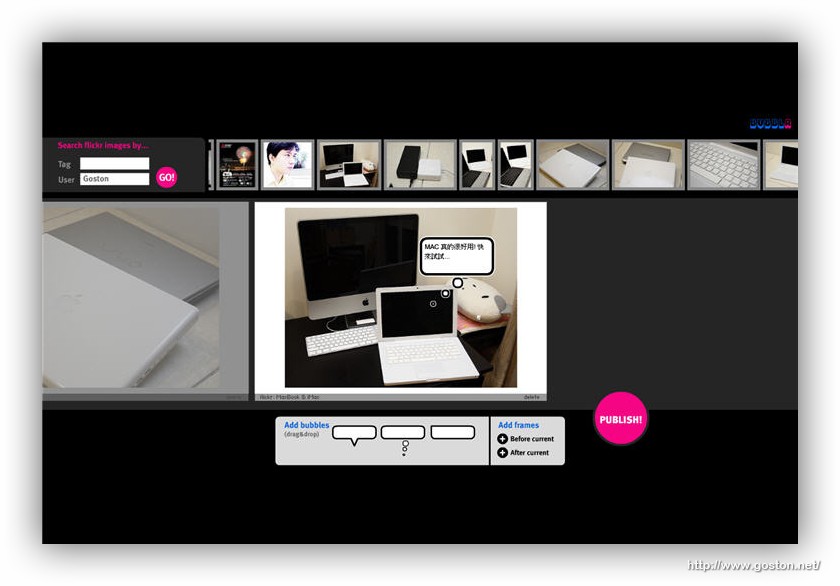

「Bubblr!」的使用方式很簡單, 只要輸入「Flickr」的 Tag 或使用者名稱, 然後挑選要製成漫畫的相片, 最後再將「Bubblr!」所提供的對話氣泡拉到相片中, 並調整好角度及位置, 就能輕鬆的完成漫畫 (連環漫畫也行哦)。

另外,「Bubblr!」還提供你一個獨立位址, 方便你將製作好的漫畫與朋友分享 (範例)。下次有有趣的相片想以漫畫手法呈現時, 不妨試試這個有趣的服務哦!

相關連結:

Technorati Tags: , ,

Entry Filed under: Flickr

post to del.icio.us  post to MyShare  post to HEMiDEMi  post to funP

4 Comments Add your own

  • 1. 湯包  |  2008/05/15 09:52 | 回覆

    您好,抱歉在這裡提個和主題無關的問題:
    點擊本站的圖片時,跳出的特別秀圖效果是怎麼辦到的呢?如果需要高深的程式語言,那麼就不用理我了,小弟我是這方面的白痴XD
    謝謝~

    Using Mozilla Firefox Mozilla Firefox 2.0.0.14 on Windows Windows XP
  • 2. goston  |  2008/05/15 10:39 | 回覆

    @湯包
    Lightbox

    Using Mozilla Firefox Mozilla Firefox 2.0.0.14 on Windows Windows XP
  • 3. 湯包  |  2008/05/15 11:11 | 回覆

    感謝~原來叫做Lightbox呀…馬上來試試看!

    Using Mozilla Firefox Mozilla Firefox 2.0.0.14 on Windows Windows XP
  • 4. George  |  2008/05/16 21:54 | 回覆

    Vaio好可憐…囧Tz

    Using Mozilla Firefox Mozilla Firefox 3.0b5 on Windows Windows XP

Leave a Comment

Required

Required, hidden

Some HTML allowed:
<a href="" title=""> <abbr title=""> <acronym title=""> <b> <blockquote cite=""> <cite> <code> <del datetime=""> <em> <i> <q cite=""> <strike> <strong>

Trackback this post  |  Subscribe to the comments via RSS Feed


Donate Me

Related Posts

Recent Posts

Recent Comments