[FF] 再也不用瞎子摸象! 快速找到瀏覽過的網頁 - ThumbStrips


2008/05/21 16:00 1,314Views


每次想找曾經瀏覽過的網頁, 總是看著瀏覽器的歷史網頁清單許久還是無法確定想找的網頁是哪一個嗎? 今天要介紹的這個「Firefox」擴充套件讓你直接看依圖索記, 再也不用瞎子摸象囉!
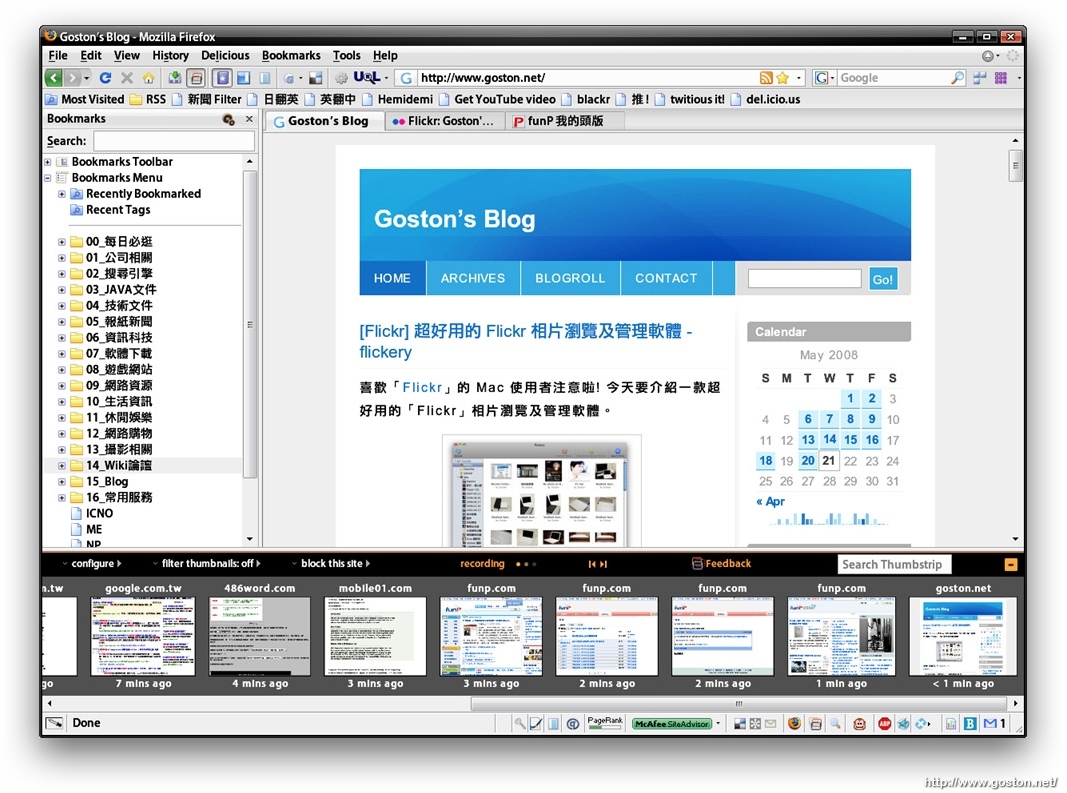

安裝好「ThumbStrips」後, 會在工具列及狀態列看到一個「ThumbStrips」的小圖示, 點下後會在瀏覽器下方以縮圖的方式顯示曾瀏覽過的網頁。

除了以縮圖顯示瀏覽紀錄外,「ThumbStrips」還允許你把瀏覽紀錄儲存下來, 存下來的瀏覽紀錄除了可以在以後載入使用, 還可以和其他「ThumbStrips」使用者分享

如果你是個健忘的人, 常常忘了曾經瀏覽過的文章是在哪個頁面, 不妨試試這個擴充套件。

相關連結:

Technorati Tags: , , ,

Entry Filed under: 軟體介紹, 電腦軟體

post to del.icio.us  post to MyShare  post to HEMiDEMi  post to funP

7 Comments Add your own

  • 1. George  |  2008/05/21 19:37

    這樣會不會吃很多空間呀??

    Using Mozilla Firefox Mozilla Firefox 3.0 on Windows Windows XP
  • 2. George  |  2008/05/21 19:39

    順代一題

    瞎子摸象好怪= =

    不是盲人摸象?>

    Using Mozilla Firefox Mozilla Firefox 3.0 on Windows Windows XP
  • 3. goston  |  2008/05/21 21:02

    @George
    瞎子摸象 或 盲人摸象都是可以的…

    Using Mozilla Firefox Mozilla Firefox 3.0 on Windows Windows Vista
  • 4. George  |  2008/05/21 21:03

    三隻小豬可以嗎?
    XD

    Using Mozilla Firefox Mozilla Firefox 3.0b5 on Linux Linux
  • 5. Octobery  |  2008/05/21 22:48

    感覺很讚也,我也要來試試..
    話說GOSTON的擴充套件還真多!

    Using Mozilla Firefox Mozilla Firefox 3.0 on Windows Windows XP
  • 6. goston  |  2008/05/21 22:57

    @Octobery
    還好啦, 我大概只裝了五十個而已… :P

    Using Mozilla Firefox Mozilla Firefox 3.0 on Windows Windows Vista
  • 7. George  |  2008/05/22 06:41

    50個?!
    我才裝3個…

    Using Mozilla Firefox Mozilla Firefox 3.0b5 on Linux Linux

Leave a Comment

Required

Required, hidden

Some HTML allowed:
<a href="" title=""> <abbr title=""> <acronym title=""> <b> <blockquote cite=""> <cite> <code> <del datetime=""> <em> <i> <q cite=""> <strike> <strong>

Trackback this post  |  Subscribe to the comments via RSS Feed


Donate Me

Related Posts

Recent Posts

Recent Comments