[資訊] 小技巧 - Gmail 如何一次寄信給多個聯絡人


2008/07/20 12:19 1,317Views


由於「Gmail」的操作邏輯及各項概念和一般大多數人常用的電子郵件軟體並不相同, 因此對剛接觸的使用者來說都需要一段不短的適應期。

對新手而言, 最常感到困擾的便是要如何一次將多個聯絡人加入收件人中…

在這裏提供兩種方法:

1. 我們可以透過群組的功能, 先將聯絡人分門別類的放入不同群組中 (如: 朋友、高中同學、同事), 以後寄信只要在收件人輸入群組名稱, 在該群組中的所有聯絡人的電子郵件位址就會被帶入收件人欄位中。

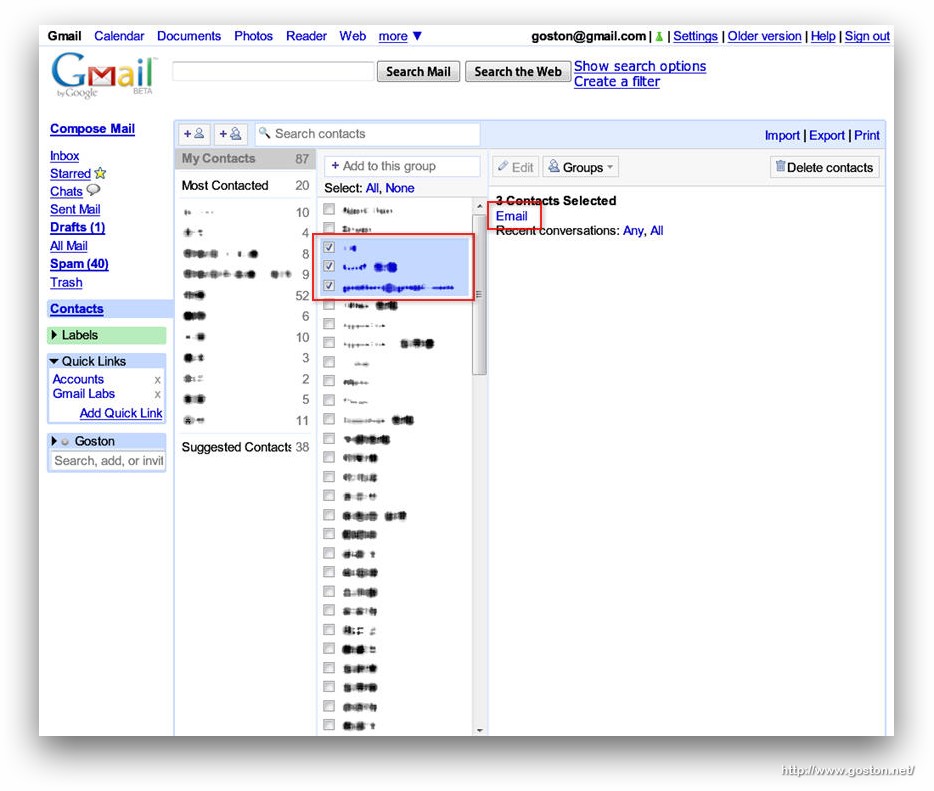
2. 在通訊錄中先勾選想寄給哪些人, 然後找到右方窗格的「Email」連結, 點選後便會自動開啟信件編輯畫面, 並將所選的聯絡人的電子郵件帶入收件人清單中:
以上, 很簡單的小技巧, 希望能幫到有同樣疑問的「Gmail」新手。

相關連結

Technorati Tags: , ,

Entry Filed under: 網際網路, 資訊科技

post to del.icio.us  post to MyShare  post to HEMiDEMi  post to funP

Leave a Comment

Required

Required, hidden

Some HTML allowed:
<a href="" title=""> <abbr title=""> <acronym title=""> <b> <blockquote cite=""> <cite> <code> <del datetime=""> <em> <i> <q cite=""> <strike> <strong>

Trackback this post  |  Subscribe to the comments via RSS Feed


Donate Me

Related Posts

Recent Posts

Recent Comments