[FF] 在 Gmail 中使用 HTML 格式簽名檔 – Blank Canvas Gmail Signatures


2008/09/24 00:15 4,047 Views

相信很多「Gmail」的愛用者都對「Gmail」無法支援 HTML 格式的簽名檔感到恨之入骨吧!? 如果你有使用 HTML 格式簽名檔的需求, 那麼不妨試試我今天要介紹的這支「Firefox」擴充套件:「Blank Canvas Gmail Signatures」(以下簡稱:「Gmail Signatures」)。
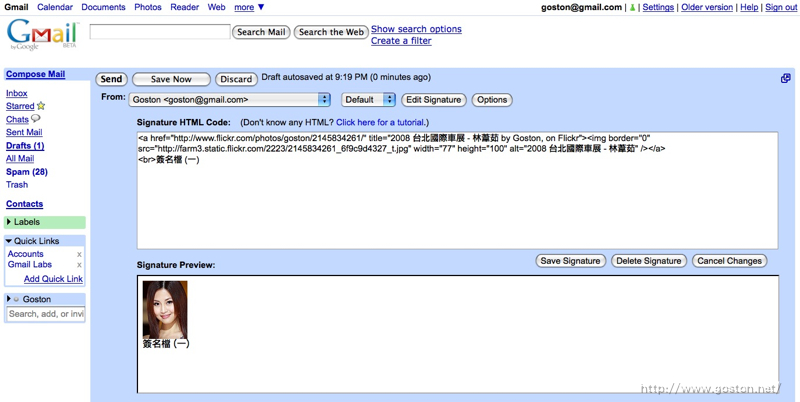

如上圖所示,「Gmail Signatures」提供了 HTML 簽名檔的編輯及預覽介面, 使用者可以在編輯區中編輯 HTML 簽名檔, 並在預覽區中即時預覽編輯的成果。

除了讓「Gmail」能很方便的使用 HTML 簽名檔外,「Gmail Signatures」最棒的地方就是可以針對不同的帳號設定不同的簽名檔, 這點對於使用「Gmail」集中收發不同信箱信件的人非常有用。

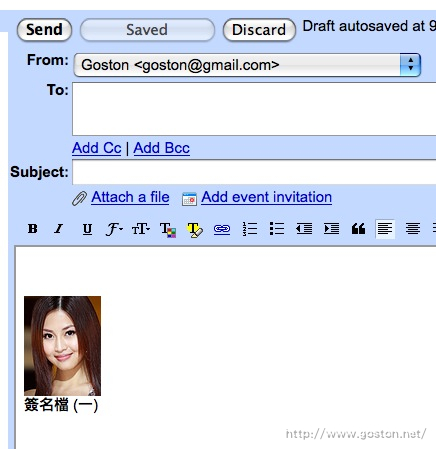
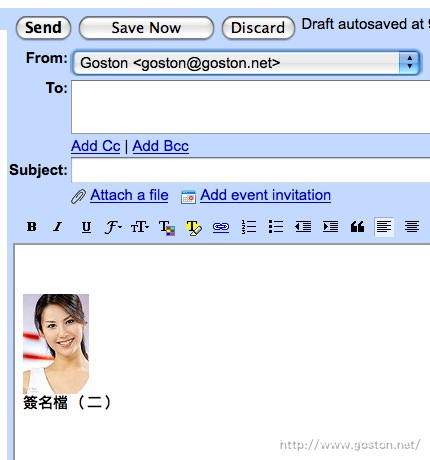
只要針對不同的帳號設定好要使用的簽名檔, 以後不管是寄信、回信、轉寄信件, 都可以根據不同的帳號使用不同的簽名檔。

例如, 使用 A 帳號來發信:
後悔了, 還是用 B 帳號寄好了, 切換到 B 帳號後簽名檔就即時變成 B 帳號的簽名檔:
如何, 是不是非常方便啊!?

註: 由於這個擴充套件仍在實驗階段, 因此想安裝的人得先註冊並登入「Firefox Add-ons」才可安裝。

相關連結:

Technorati Tags: , ,

Entry Filed under: 軟體介紹, 電腦軟體

post to del.icio.us  post to MyShare  post to HEMiDEMi  post to funP

6 Comments Add your own

  • 1. 展順境  |  2008/10/08 11:46

    安裝好套件,點擊編輯簽名,在標題為「簽名的HTML程式碼」的輸入框右擊,才能真正進入編輯模式,這算BUG嗎?

    Using Mozilla Firefox Mozilla Firefox 3.0.3 on Windows Windows XP
  • 2. 展順境  |  2008/10/08 11:58

    我在編輯框裡有折行預覽卻沒有折行

    Using Mozilla Firefox Mozilla Firefox 3.0.3 on Windows Windows XP
  • 3. goston  |  2008/10/08 12:30

    @展順境
    換行請用 HTML 的換行標籤 <br />

    Using Mozilla Firefox Mozilla Firefox 3.0.3 on Mac OS Mac OS X
  • 4. rubynic  |  2009/03/21 01:55

    請問這個套件 現在還可以使用嗎?
    我已經完成安裝了
    但是找不到任何可以編輯簽名檔的地方>』<

    Using Mozilla Firefox Mozilla Firefox 3.0.7 on Windows Windows XP
  • 5. Gmail Signatures 用html&hellip  |  2009/06/26 09:51

    [...] 延伸閱讀:在Gmail 中使用HTML格式簽名檔 瀏覽:1人次 Tagged as: firefox, gmail No Comments Comments (0) Trackbacks (0) ( subscribe to [...]

    Using WordPress WordPress 2.8
  • 6. RamanRabbit  |  2009/12/22 19:38

    Thanks for share this.

    Using Internet Explorer Internet Explorer 8.0 on Windows Windows Vista

Leave a Comment

Required

Required, hidden

Some HTML allowed:
<a href="" title=""> <abbr title=""> <acronym title=""> <b> <blockquote cite=""> <cite> <code> <del datetime=""> <em> <i> <q cite=""> <strike> <strong>

Trackback this post  |  Subscribe to the comments via RSS Feed


Donate Me

Related Posts

Recent Posts

Recent Comments