[FF] JavaScript 的進階設定


2005/05/15 15:55 4,596Views


常常逛網頁都會逛到一些網站鎖定滑鼠右鍵, 這對我來說時常造成困擾。在使用 Maxthon 時有 Enable Right Click 這個 Plug-in 可以使用, 而在 Firefox 中我一直是使用 WebDeveloper 的停用 JavaScript 來處理。直到…

Memei BLOG這篇文章發現原來 Firefox 有這個選項, 害我之前還都在用擴充套件在做這件事… Orz
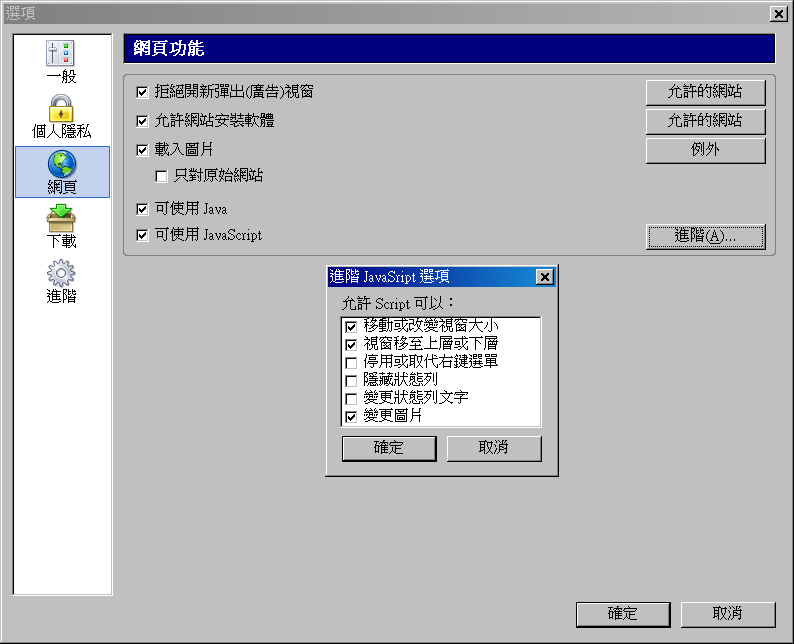
JavaScript 的進階設定

如上圖所示, 只要把「停用或取代右鍵選單」取消選取, 這樣以後就不用再為滑鼠右鍵被停用而煩腦了。

在此也請各位偉大的網站站長行行好, 不要動不動就鎖定滑鼠右鍵啊! 感恩啊!

Entry Filed under: 軟體介紹, 電腦軟體

post to del.icio.us  post to MyShare  post to HEMiDEMi  post to funP

1 Comment Add your own

  • 1. Goston’s Blog &raqu&hellip  |  2007/02/11 19:01 | 回覆

    [...] 「別再自欺欺人了」, 當你把東西放上網路, 基本上就已經沒有任何的隱密性可言了。先別談現在已經有許多瀏覽器內建有防止鎖右鍵的功能, 鎖定滑鼠右鍵還會造成瀏覽者瀏覽時的不便, 特別是現在許多瀏覽器都支援「滑鼠手勢」功能的情況下, 更是如此。 其實, 不管你怎麼鎖右鍵, 稍具基礎的人都可以很容易解開, 舉個例子: 請你進到 Google 的首頁, 然後在網址列貼上下列的程式碼後按 Enter: [...]

    Using WordPress WordPress 2.1

Leave a Comment

Required

Required, hidden

Some HTML allowed:
<a href="" title=""> <abbr title=""> <acronym title=""> <b> <blockquote cite=""> <cite> <code> <del datetime=""> <em> <i> <q cite=""> <strike> <strong>

Trackback this post  |  Subscribe to the comments via RSS Feed


Donate Me

Related Posts

Recent Posts

Recent Comments