[Flickr] Flickr 兩項新功能上線


2006/11/21 21:44 2,394Views


知名相片分享平台「Flickr」於今天又新增了兩個方便分享相片的功能了。
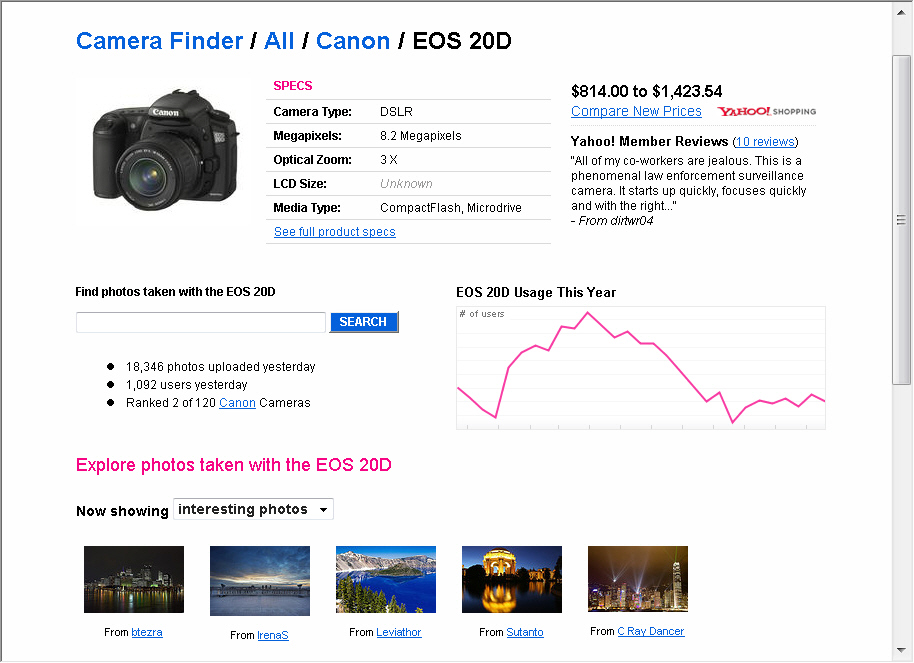
  • Camera Finder
    顧名思義, 這個功能就是用來列出在 Flickr 上某台相機所拍攝的照片, 除了列出照片外, 還會有一年來上傳照片數量的曲線圖可參考。


    透過這個功能, 要找到某台相機拍的照片將更為容易。

    想找找和你用同一台相機的人嗎? 在「Explore」選單就能找到這個功能。
  • Share this set
    在以前我們可能把某個 Set 中的相片 (比如說出遊的親密照) 都設為 Private 並指定能夠觀看相片的角色 (Family 或 Friend), 藉以保護自己的隱私、防止照片被不相干的人看到。; 然而有時候可能你想分享的對象並不是 Flickr 的會員, 而你又不想將 Set 中的照片都設為 Public (這會使得任何人都看得見你的相片), 此時「Share this set」這個功能便派上用場了!

    這個功能會為 Set 產生一個特別的網址, 只要把這個特別的網址傳給你想分享的對象, 那麼就算他不是 Flickr 的會員, 他也可以看到 Set 中的照片。也就是說, 只要有了這個網址, 任何你想分享的對象都可以毫無困難的看到你想分享給他們的照片。

    這個功能可以在 Set 中找到:

    進入這個功能後會看到如下的畫面:

    只要依照畫面指示做設定即可。

相關連結:

Technorati Tags:

Entry Filed under: Flickr

post to del.icio.us  post to MyShare  post to HEMiDEMi  post to funP

7 Comments Add your own

  • 1. 1905  |  2006/11/22 11:00

    太好了!
    Share this set 這個功能就就是我為何還用Picasa的原因, 看來也可以將相片share一些到Flickr了^^

    Using Mozilla Firefox Mozilla Firefox 2.0 on Windows Windows XP
  • 2. linolo  |  2006/11/22 22:08

    其實flickr還更新了 mobile ste,http://m.flickr.com/ 跟以前相比增加了不少資訊,而且單鍵操作也更方便了。

    Using Mozilla Firefox Mozilla Firefox 2.0 on Windows Windows XP
  • 3. goston  |  2006/11/22 22:18

    @linolo
    我沒在用, 所以自動忽略… XD

    Using Mozilla Firefox Mozilla Firefox 2.0 on Windows Windows Vista
  • 4. tanjun  |  2006/11/22 22:30

    一直在等類似 Share this set 這類的功能…
    Flickr 還是有再進不滴…

    Using Internet Explorer Internet Explorer 6.0 on Windows Windows 2000
  • 5. goston  |  2006/11/22 23:09

    @tanjun
    對啊!
    我則是一直在等待類似 Camera Finder 的功能, 現在 Flickr 做出來了, 真是令人高興…

    選擇 Flickr 就對了啦!!

    Using Mozilla Firefox Mozilla Firefox 2.0 on Windows Windows Vista
  • 6. 星子  |  2006/11/27 13:30

    太棒了!困擾已久的問題解決了!

    Using Mozilla Firefox Mozilla Firefox 1.5.0.8 on Windows Windows XP
  • 7. KATES  |  2006/12/06 18:28

    謝謝分享嚕..
    拿來用 ^^

    Using Internet Explorer Internet Explorer 6.0 on Windows Windows XP

Leave a Comment

Required

Required, hidden

Some HTML allowed:
<a href="" title=""> <abbr title=""> <acronym title=""> <b> <blockquote cite=""> <cite> <code> <del datetime=""> <em> <i> <q cite=""> <strike> <strong>

Trackback this post  |  Subscribe to the comments via RSS Feed


Donate Me

Related Posts

Recent Posts

Recent Comments