前一篇才介紹了個給 Gmail 用的 Stylish Style, 結果馬上就又讓我找到一個更酷的了! 那就是「Gmail Super Clean」
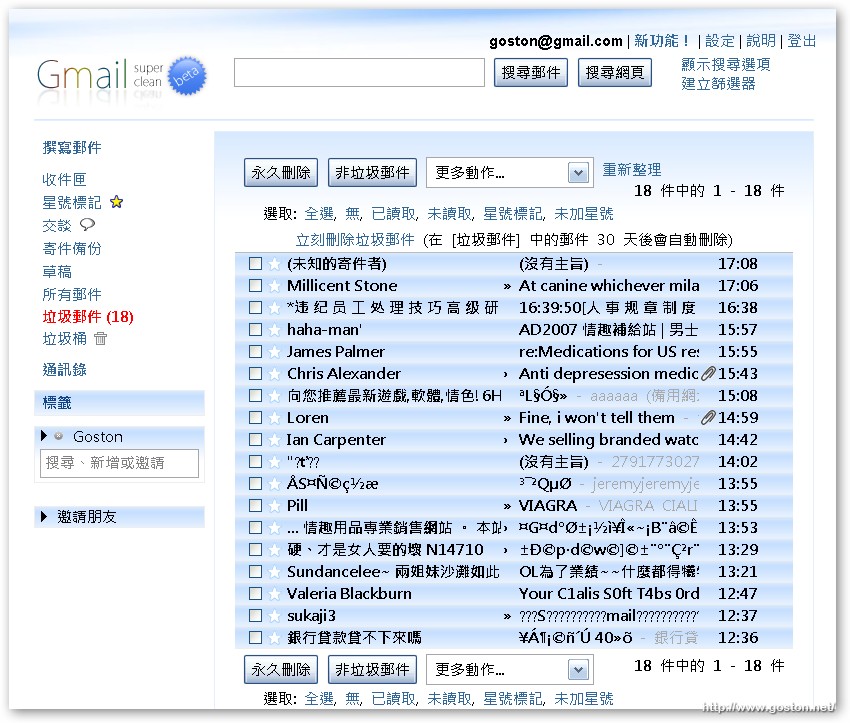
不過, 注意啦! 這個是給「Greasmonkey」用的, 而不是 Stylish 哦!
前兩天看到有人希望能有個高質感的 Gmail 佈景能用, 看來這個應該符合他的需求!?
相關連結:
[tags]Google, Gmail, Firefox, Greasemonkey, Extension, Script[/tags]
3C、Mac、攝影、電玩、生活
前一篇才介紹了個給 Gmail 用的 Stylish Style, 結果馬上就又讓我找到一個更酷的了! 那就是「Gmail Super Clean」
不過, 注意啦! 這個是給「Greasmonkey」用的, 而不是 Stylish 哦!
前兩天看到有人希望能有個高質感的 Gmail 佈景能用, 看來這個應該符合他的需求!?
相關連結:
[tags]Google, Gmail, Firefox, Greasemonkey, Extension, Script[/tags]
網頁介紹說:有User script
可是我裝好後那選項是反白的耶!
@星子
我的能用耶… 呵呵…
Dear 星子,
我剛裝好後跟你一樣也是反白的
重開 Firefox 就會自動套用囉!
用到剛剛發現這個 Style 跟實際上的 Gmail 配至少了點東西
例如 Web Clips
Gmail 的配置還是蠻優的,真是百看不膩阿
Dear Dolittle,
經你提醒,果真如此!能用了…:))
我也覺得Gmail原本的介面很優
Simple is the best!
BTW, Web clip是啥功能啊?
沒留意過
Dear 星子,
Web Clip 可此從 Settings > Web Clips 選擇關閉或開啟
主要是顯示自己訂閱的 RSS,當然在某些情況跟地方還是會有 Google 廣告的 :p
不知道 有沒有人知道要如何移除呢?
謝謝
@咪
瀏覽器右下角有一個猴子的頭, 在上面按滑鼠右鍵選擇 Manager User Scripts, 就能看到移除 Script 的選項了
喔,還有這種東西,我都沒有去改他的版面,用習慣了
to goston
謝謝你囉
因為我發現我的顏色都無法使用
所以把他調回來好了