[Flickr] GM Script - Flickr Fav and Sets Magnifier


2007/05/07 09:52 2,101Views


前幾天 CK 在他的 Blog 上介紹了「FlickrFavMagnifier」這個方便的 GM Script, 它可以讓你在瀏覽自己或其他人 Favorites 的相片時, 於滑鼠指標指到的縮圖上出現較大的相片。

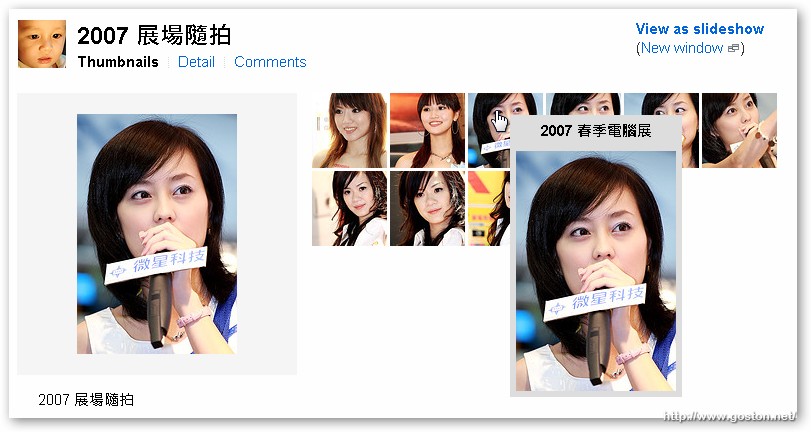
我個人在 SET 畫面也很需要這個功能, 雖然在 SET 的「Detail View」中就可以看到完整的相片, 不過畢竟「Detail View」並不是 SET 的預設 View, 每次都還要點連結切換也挺麻煩的, 所以就動手改了一下「FlickrFavMagnifier」這支 Script, 讓它也可以在 SET 中使用。

我將這支 Script 命名為「Flickr Fav and Sets Magnifier」, 使用前請先安裝「Greasemonkey」; 另外若你已經有安裝「FlickrFavMagnifier」這支 Script 的話也請先停用或移除, 因為我已經把該 Script 的功能都整合進來了。使用後效果如下:

在 Favorites 頁面:

在 Set 頁面:
修正歷史:

  • 2007.05.07 - 程式初版釋出
  • 2007.05.08 - 修正未設定 Alias, 網址帳號「@」符號造成無法產生縮圖的問題
  • 2008.01.29 - 修正預覽圖片跑到縮圖後的問題 (z-index)

 
下載連結: flickr-fav-sets-magnifier.user.js

Entry Filed under: Flickr, 軟體介紹, 電腦軟體

post to del.icio.us  post to MyShare  post to HEMiDEMi  post to funP

18 Comments Add your own

  • 1. sandor  |  2007/05/07 10:25 | 回覆

    這個功能我喜歡 謝啦 :)

    Using Mozilla Firefox Mozilla Firefox 2.0.0.3 on Windows Windows XP
  • 2. Blog of Flickr Hacks&hellip  |  2007/05/07 11:01 | 回覆

    GM Script: Flickr Fav and Sets Magnifier…

    上回介紹了 FlickrFavMagnifier 這支 GM Script 後, Goston 也跟進改造了這支好用的 script. 他增加了對 Set 的支援, 可以在瀏覽 Sets 的相片時也能有一樣的效果. Goston 的 GM Script - Flickr Fav and Sets Magnifier……

    Using MovableType MovableType 3.2
  • 3. MaxChu  |  2007/05/07 11:04 | 回覆

    good job!!

    Using Mozilla Firefox Mozilla Firefox 2.0.0.3 on Windows Windows XP
  • 4. Marce  |  2007/05/07 11:53 | 回覆

    這功能好用~
    省得以往都需要點開來看..

    多謝囉~

    Using Mozilla Firefox Mozilla Firefox 2.0.0.3 on Windows Windows XP
  • 5. VicJuan 影像日記 &raq&hellip  |  2007/05/07 12:51 | 回覆

    [...] 發覺真的很不錯用 是瀏覽flickr的favorite與set頁面的好工具 下載點就在這篇文章內 由於傳統的flickr的set頁面只會顯示所有照片的square size縮圖 [...]

    Using WordPress WordPress 2.1.3
  • 6. Rita  |  2007/05/07 13:14 | 回覆

    好用!謝啦~

    Using Mozilla Firefox Mozilla Firefox 2.0.0.3 on Windows Windows XP
  • 7. Nineteen  |  2007/06/07 00:53 | 回覆

    感謝!這真的很好用啊~~~
    不過我發現如果使用 flickr auto page 這個 script 來看 set 的話,他自己跑出來的下一頁縮圖就沒辦法使用了,請問這個有辦法解決嗎?

    Using Unbranded Firefox Unbranded Firefox 2.0.0.3 on Windows Windows XP
  • 8. goston  |  2007/06/07 09:09 | 回覆

    @Nineteen
    沒有… XD

    因為這個 Script 是在頁面載入後才會執行一次, 以 AJAX 的方式來取得的圖片並不會重新載入頁面.. 所以就…

    Using Mozilla Firefox Mozilla Firefox 2.0.0.4 on Windows Windows XP
  • 9. Nineteen  |  2007/06/08 01:21 | 回覆

    哈哈,沒關係沒關係,他還是個好東西,感謝你^^

    Using Unbranded Firefox Unbranded Firefox 2.0.0.3 on Windows Windows XP
  • 10. decembre  |  2007/07/12 15:42 | 回覆

    great tweak!
    thanks

    Using Mozilla Firefox Mozilla Firefox 2.0.0.4 on Windows Windows XP
  • 11. decembre  |  2007/07/12 15:51 | 回覆

    It’s possible to work on more thumbnail in flickr?

    Using Mozilla Firefox Mozilla Firefox 2.0.0.4 on Windows Windows XP
  • 12. goston  |  2007/07/12 16:09 | 回覆

    @decembre
    Maybe you can try another GM Script - FlickrBox… :)

    Using Mozilla Firefox Mozilla Firefox 2.0.0.4 on Windows Windows XP
  • 13. decembre  |  2007/08/12 19:11 | 回覆

    I had tested FlickrBox , and it seems not take effects on Flickr thumb’s…
    But i prefer your tweak a lot !
    A suggest : post it in Flickr Hacks, with some explantion ;-)

    Using Mozilla Firefox Mozilla Firefox 2.0.0.6 on Windows Windows XP
  • 14. Nineteen  |  2008/02/16 22:06 | 回覆

    不好意思,我又來了^^||

    這個 script 真是相當的方便,不過最近發現一個問題,就是不知道從哪時候開始,我的預覽圖全都跑到縮圖的下層了,像這樣,圖中我的滑鼠是放在第二張縮圖上~我也試過看其他的預覽圖,發現都還是蓋在標題之類的文字之上,也就是只會被縮圖蓋住,不過如此一來只要看照片多一點的相簿…就全被蓋光光了 XD(只能從縮圖間的縫隙看到一滴滴 XDD)

    因為前陣子 flickr 似乎又改過他們的網頁,像 AllSizes+ 也有被影響過,所以想說會不會跟這個有關,希望有空的話可以幫我看一下^^(也希望不是我自己的問題,不然就不知道該怎麼辦了…)

    Using Mozilla Firefox Mozilla Firefox 2.0.0.11 on Windows Windows XP
  • 15. Nineteen  |  2008/02/17 02:26 | 回覆

    ㄟ…不好意思,我現在才發現原來針對我的問題早就有更新了,跟白痴一樣 XDD
    再次感謝你提供這個好用的 GM script!
    (可以的話能幫我刪掉上面那篇嗎 XD)

    Using Mozilla Firefox Mozilla Firefox 2.0.0.11 on Windows Windows XP
  • 16. decembre  |  2008/06/19 04:58 | 回覆

    Great , it’s the best way….
    Can you do the same magical work for all gallery ?

    Using Mozilla Firefox Mozilla Firefox 2.0.0.14 on Windows Windows XP
  • 17. decembre  |  2008/06/19 05:08 | 回覆

    @decembre:

    Great, It Work so fine!.

    This Magnifer it’s the best way….fast and not too big…

    Can you do the same magical work for all gallery (I know , i had asked that some tme ago, but …)?

    Post this one in :
    [url=http://www.flickr.com/groups/flickrhacks/]Flickr Hack[/url]

    Using Mozilla Firefox Mozilla Firefox 2.0.0.14 on Windows Windows XP
  • 18. decembre  |  2008/06/19 05:09 | 回覆

    @decembre:

    Great, It Work so fine!.

    This Magnifer it’s the best way….fast and not too big…

    Can you do the same magical work for all gallery (I know , i had asked that some tme ago, but …)?

    And The Same Suggest : post it in Flickr Hacks, with some explantion

    Using Mozilla Firefox Mozilla Firefox 2.0.0.14 on Windows Windows XP

Leave a Comment

Required

Required, hidden

Some HTML allowed:
<a href="" title=""> <abbr title=""> <acronym title=""> <b> <blockquote cite=""> <cite> <code> <del datetime=""> <em> <i> <q cite=""> <strike> <strong>

Trackback this post  |  Subscribe to the comments via RSS Feed


Donate Me

Related Posts

Recent Posts

Recent Comments