[BLOG] Blog 貼圖好幫手 - 照片框產生器


2007/10/03 15:09 4,464Views


沒有美術天份, 因此只能老是羨慕別人 Blog 上貼的相片有漂亮且具質感的相框, 而自己卻做不出來嗎?
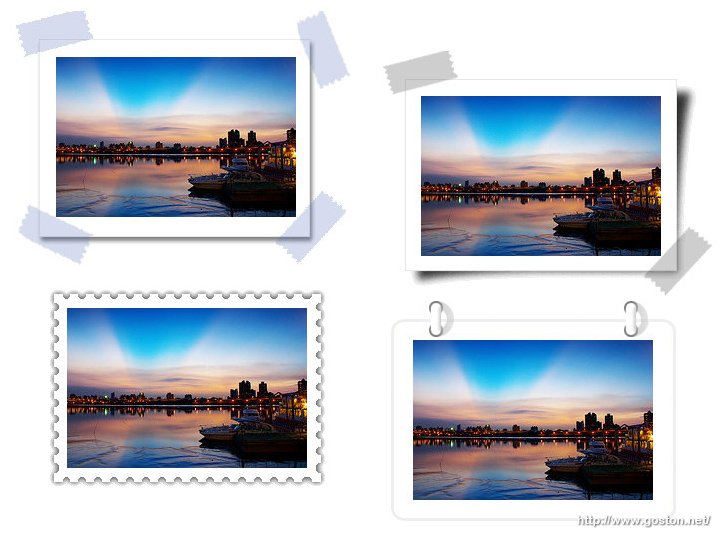
何不利用「照片框產生器」為 Blog 上的相片加上一個高質感的相框呢!?

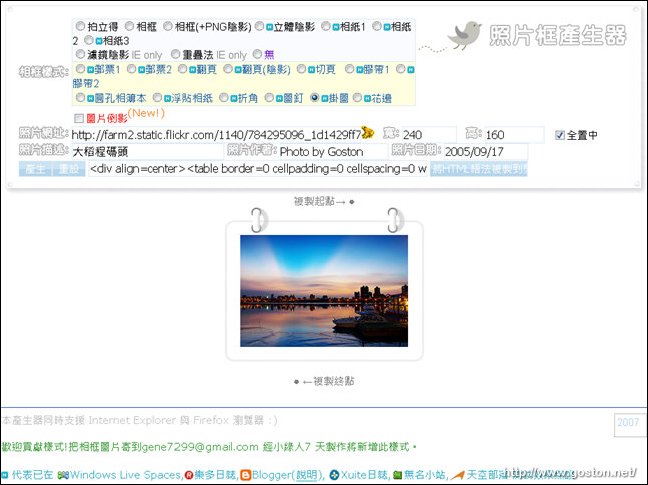
「照片框產生器」的使用方式非常簡單, 只要決定好相框的樣式, 並給它一個圖片位址, 它便能立刻產生出貼圖的語法:
只要將它所給的語法貼在 Blog 文章中, 就能有一個漂亮、有質感的相框囉! 像下面這個就是利用「照片框產生器」的「拍立得」樣式所做出來的:

大稻程碼頭
2005/09/17
Photo by Goston

看起來很不錯吧! 趕快去玩玩看!

相關連結:

Entry Filed under: 網際網路, 資訊科技, 部落格, 部落格新玩意

post to del.icio.us  post to MyShare  post to HEMiDEMi  post to funP

4 Comments Add your own

  • 1. Robbin  |  2007/10/03 18:26

    這個超棒,我對框最沒輒
    有時候又覺得自己加的框把本來的照片弄得更糟了

    Using Internet Explorer Internet Explorer 6.0 on Windows Windows XP
  • 2. B.C.  |  2007/10/04 08:44

    竟然還有這一招 =.=
    寫這個出來的也真會想,真的有強到,
    說不定哪天編輯器會把照片框產生器掛進去 @@

    Using Mozilla Firefox Mozilla Firefox 2.0.0.7 on Windows Windows Server 2003
  • 3. Twyla'blog » Blog A&hellip  |  2007/10/08 07:02

    [...] Blog 貼圖好幫手 - 照片框產生器 [...]

    Using WordPress WordPress 2.3
  • 4. HALA PRINCESS  |  2007/10/30 13:49

    上面連結開不了說>_<

    Using Internet Explorer Internet Explorer 7.0 on Windows Windows XP

Leave a Comment

Required

Required, hidden

Some HTML allowed:
<a href="" title=""> <abbr title=""> <acronym title=""> <b> <blockquote cite=""> <cite> <code> <del datetime=""> <em> <i> <q cite=""> <strike> <strong>

Trackback this post  |  Subscribe to the comments via RSS Feed


Donate Me

Related Posts

Recent Posts

Recent Comments