[軟體] 免費、穩定、好用的 Ramdisk – Gavotte Ramdisk


2007/12/17 10:53 211,520Views

隨著 RAM 的價格愈來愈低, 這陣子 Ramdisk 有愈來愈熱門的趨勢, 所謂的 Ramdisk 顧名思義就是將 RAM 虛擬成一顆磁碟機, 藉由 RAM 超快的存取速度來加速程式運行的速率。長久以來我一直使用「Gavotte Ramdisk」這套免費、穩定、好用的 Ramdisk 軟體, 如果你也想利用 Ramdisk 加速系統的運行, 不妨考慮使用它。

一般來說, 要玩 Ramdisk 建議記憶體要大些才好, 這樣才能較明顯的體驗系統效能的改善。以我為例: 我的 PC 裝有 3GB 的 RAM, 我將其中的 1GB 切做 Ramdisk (為什麼切這麼大稍後說明); 而我筆電的 RAM 較少, 只有 1.5GB 因此我僅切了 512MB 的記憶體當做 Ramdisk。

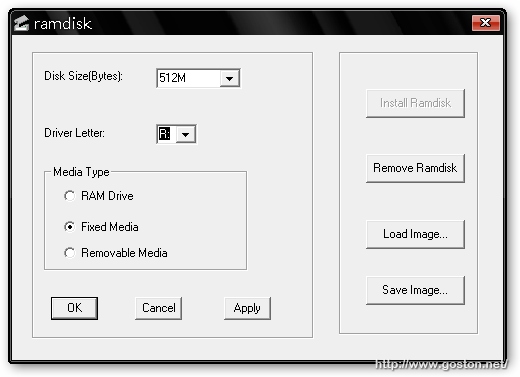
「Gavotte Ramdisk」的使用方式非常簡單, 只要將下載後的檔案解壓縮後, 執行「ramdisk.exe」, 接著便會出現如下視窗:

先按下「Install Ramdisk」鍵新增一台 Ramdisk, 接著設定磁碟大小及磁碟代號, 媒體類型 (Media Type) 請選擇「Fixed Media」, 因為等下要將 Windows 的虛擬記憶體設過來 (這就是我 PC 切 1GB 給 Ramdisk 的原因)。設定好後按下「OK」, 接著在檔案總管就會看到多出一台磁碟機, Ramdisk 的設定至此完成, 接著就可以開始使用 Ramdisk 啦。

接下來這些動作要不要做就看個人了!

將 Windows 的虛擬記憶體設定到 Ramdisk (下圖是我筆電的設定):
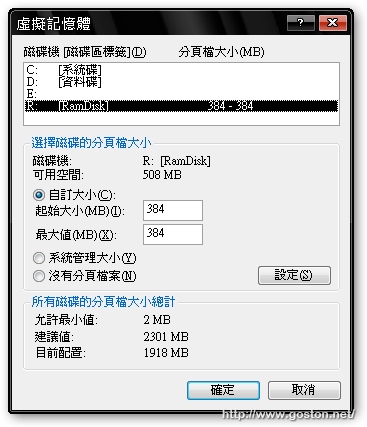
有很多人一定會說:「RAM 那麼大, 直接把虛擬記憶體強制取消就好了, 幹嘛還要這麼費工把虛擬記憶體設到 Ramdisk 上?」其實, 有些軟體不管主機中的 RAM 有多大, 在運作時仍會強制使用虛擬記憶體, 若是將虛擬記憶體強制關閉, 可能會導致這些程式運作不正常, 因此我選擇將虛擬記憶體設定在 Ramdisk 上, 以避免這些程式運作不正常。

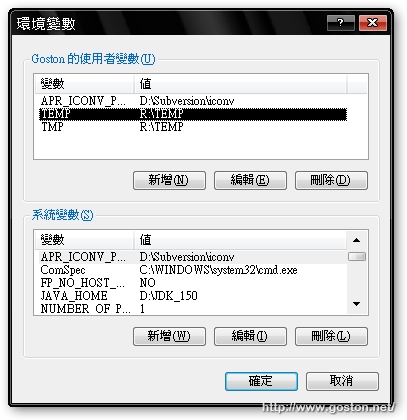
將 Windows 的暫存檔路徑設定到 Ramdisk 上, 如下圖 (如果你常有安裝大型軟體及解壓縮大型檔案的需求, 則不建議將暫存檔路徑設到 Ramdisk):
將 IE 及 Firefox 的 Cache 設定到 Ramdisk 上, 由於 IE 可以直接在選項中設定, 在此就不再做說明。Firefox 若要改變 Cache 存放的路徑, 請在位址列輸入「about:config」接著新增一個型態為「String」的參數, 名稱設為「browser.cache.disk.parent_directory」值的話就設為欲存放的路徑。

另外, 由於 Ramdisk 的資料會隨著系統關機消失, 因此一般都是將 Ramdisk 用來當各種暫存檔的存放處。若你有保存 Ramdisk 的資料的需求, 可以寫一個批次檔 (BAT 檔) 用「xcopy」指令將 Ramdisk 的資料備份出來, 並設定在開機時自動將備份的資料寫回 Ramdisk。方法如下:

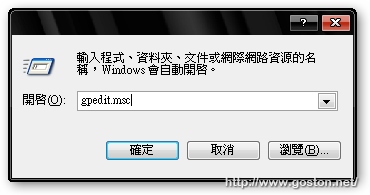
分別寫一個備份及回存資料的批次檔, 然後執行「gpedit.msc」:

找到「使用者設定」→「Windows 設定」→「指令碼 (登入/登出)」:
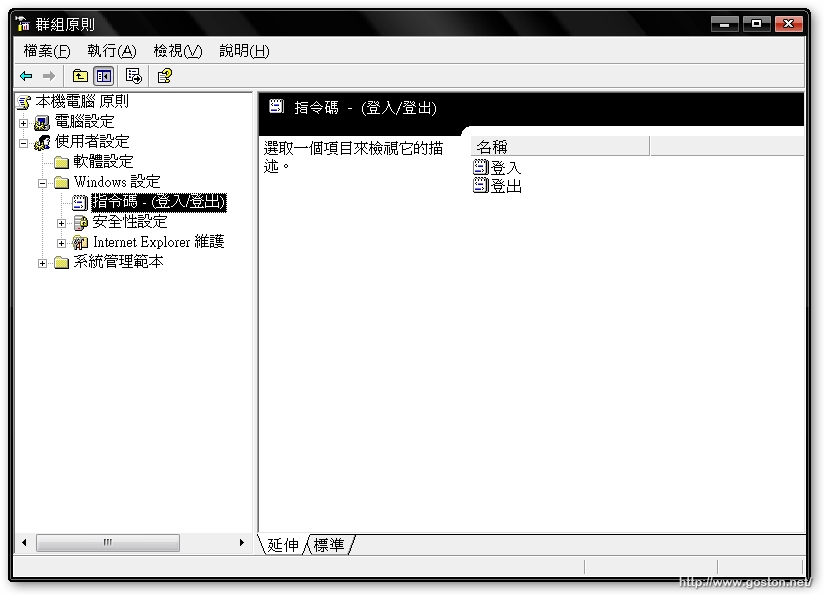
在「登入」的地方將回存的 BAT 檔加入,「登出」的地方則加入備份的 BAT 檔即可。

想體驗 Ramdisk 的極速快感嗎? 快試試「Gavotte Ramdisk」吧!

相關連結:

Entry Filed under: 軟體介紹, 電腦軟體

post to del.icio.us  post to MyShare  post to HEMiDEMi  post to funP

69 Comments Add your own

  • 1. DearHoney 數位音樂工&hellip  |  2007/12/18 00:45

    強烈推薦 RAM DISK 來增加系統效能…

    今天看了 Goston 的[軟體] 免費、穩定、好用的 Ramdisk – Gavotte Ramdisk 一文後,一時心癢難耐,猴急衝動,馬上下訂 2GB 的 RAM,回家以後急躁的將本站的外衣脫去,用力的將新歡插入後,按照 Goston…

    Using WordPress WordPress 2.3.1
  • 2. 滷蛋  |  2007/12/18 11:42

    這一篇教學真不錯, 不曉得這套軟體能不能用在 x64 的 windows 上面呢? 因為我現在用的是 2G x4, 所以都搭配著 x64 的環境來使用.

    Using Internet Explorer Internet Explorer 6.0 on Windows Windows XP
  • 3. goston  |  2007/12/18 11:46

    @滷蛋
    應該不行… 我猜啦… XD

    Using Mozilla Firefox Mozilla Firefox 2.0.0.11 on Windows Windows XP
  • 4. ago  |  2007/12/18 13:21

    想請教,上面的FireFox設定,我怎麼設他都會是”整數”,而不是”字串”(字串才能設定路徑)。

    請問該怎麼解決呢

    Using Mozilla Firefox Mozilla Firefox 2.0.0.4 on Windows Windows XP
  • 5. Cecil  |  2007/12/18 13:32

    推薦一個 對岸高手改寫的
    他的特色是: “使用核心內存池的NonPaged內存,所以在任何資源狀況下都不會被分頁到硬盤上的頁面文件。”

    如果我理解的沒錯, 在正常狀況下, RAM的資料都會被放到 page file, 這樣對RAM Disk 根本是多此一舉, 所以改用 nonpaged pool來做 RAM Disk

    Using Internet Explorer Internet Explorer 7.0 on Windows Windows XP
  • 6. ago  |  2007/12/18 13:35

    結果重新安裝一次,問題解決了,感謝分享這個方法。

    Using Mozilla Firefox Mozilla Firefox 2.0.0.4 on Windows Windows XP
  • 7. Goodspeed  |  2007/12/19 10:34

    請問如何把 Opera (9.50b) 的 Cache 移至 RamDisk 中呢?
    謝謝!

    Using Opera Opera 9.50 on Windows Windows XP
  • 8. Makoto  |  2007/12/20 14:10

    請問如果不用記憶體而用隨身碟是否有同樣效果呢?

    Using Mozilla Firefox Mozilla Firefox 2.0.0.11 on Windows Windows XP
  • 9. goston  |  2007/12/20 14:16

    @Makoto
    隨身碟的速度比 RAM 慢太多了…

    Using Mozilla Firefox Mozilla Firefox 2.0.0.11 on Windows Windows XP
  • 10. qualle  |  2007/12/20 20:50

    To:Goodspeed

    1.Opera的Address Bar打「opera:config」

    2.搜尋:「cache」

    3.找到「cache directory4」這個項目。

    4.調到Ramdisk即可。
    (以我為例:「R:\Temp\Opera\cache4\」)

    5.甚至連「Temporary Download Directory」這個項目都可以改到Ramdisk上。

    ———————————————————
    Ramdisk轉眼間已經陪伴我兩年了…
    在這裡也是大力推薦!

    Using Opera Opera 9.50 on Windows Windows XP
  • 11. gameguy  |  2007/12/31 16:35

    這要怎麼說,Gavotte Ramdisk這套是目前我用過載入分頁檔比較會正常的軟體,不過比較難搞的是64bit版本無法取得是這套(某論壇封鎖住新用戶註冊)最大的敗筆

    頂一下:)

    Using Opera Opera 9.50 on Windows Windows XP
  • 12. biotite  |  2008/01/03 02:04

    請問一下, 您知道如何在Vista 家庭版加入 開關機資料讀入寫出的批次檔嗎? 家庭版裡沒有 gpedit.msc 檔, 您知道如何手動寫入嗎? 可改哪個 ini 檔加入嗎?

    Using Internet Explorer Internet Explorer 7.0 on Windows Windows XP
  • 13. Ulin  |  2008/01/12 13:26

    請問可以教我怎麼在vista64安裝嗎
    以下是Gavotte Ramdisk支援64位元的版本
    http://www.badongo.com/file/7201826
    但是有寫到那個安裝介面不能在x64使用
    必須手動安裝但是我不知道如何安裝
    希望有人可以寄個安裝流程給我~3Q

    Using Internet Explorer Internet Explorer 7.0 on Windows Windows Vista
  • 14. goston  |  2008/01/13 11:16

    @Ulin
    Vista 不需要安裝這類軟體…

    Using Mozilla Firefox Mozilla Firefox 2.0.0.11 on Windows Windows XP
  • 15. Ulin  |  2008/01/13 11:38

    的確在效能上不需要這類軟體
    但我是需要他讀寫的速度
    我打算開6G拿來放共享檔案給區網的人抓
    放在硬碟只會跑1000m頻寬的60%
    放在ramdisk可以跑95%大大的省去時間
    可以的話請告訴我安裝流程…(跪求)
    雖然我知道其他的ramdisk支援vista64了
    但是我想使用我發問的這款

    Using Internet Explorer Internet Explorer 7.0 on Windows Windows Vista
  • 16. 小葉  |  2008/01/14 10:35

    請問一下,在RAMDISK中會產生TEMP和recycled目錄,資源回收筒中已經把容量設為0且把直接刪除檔案打勾,然後進檔案管把那兩個礙眼的目錄刪除,可十重開機又會被建立,有辦法解決嗎?

    Using Internet Explorer Internet Explorer 7.0 on Windows Windows XP
  • 17. 好吃  |  2008/01/22 20:23

    站主你好,請問你說到的
    「寫一個批次檔 (BAT 檔) 用『xcopy』指令將 Ramdisk 的資料備份出來, 並設定在開機時自動將備份的資料寫回 Ramdisk。」
    這個批次檔該怎麼寫呢?

    因為小弟不太懂程式(還是DOS?)所以不知道該怎麼做…
    可否請站主詳細說明這部份呢? ^^”
    或是有直接寫好的? XD

    Using Internet Explorer Internet Explorer 7.0 on Windows Windows XP
  • 18. goston  |  2008/01/22 22:00

    @好吃

    寫一個內容類似 xcopy R:\ C:\Backup\ /S 的批次檔將 RAMDISK 的內容存到 C:\Backup\, 然後相反的再寫一個將 C:\Backup\: 的內容 Copy 回 R:\ (RAMDISK) 的批次檔, 然後將這兩個檔分別掛在開機及關機時執行即可…

    如果不太懂 xcopy 的用法, 只要在 命令提示字元 (cmd 指令) 下打 help xcopy 即可得到詳細的說明了…

    Using Mozilla Firefox Mozilla Firefox 2.0.0.11 on Windows Windows XP
  • 19. Selivia  |  2008/01/23 01:54

    下載點已經失效了,請問有新的下載點嗎?

    Using Mozilla Firefox Mozilla Firefox 2.0.0.11 on Windows Windows XP
  • 20. goston  |  2008/01/25 09:05

    @Selivia

    我換了一個載點: Gavotte Ramdisk.rar

    Using Mozilla Firefox Mozilla Firefox 2.0.0.11 on Windows Windows XP
  • 21. BLUEFANCY  |  2008/01/30 20:00

    請問要怎麼寫批次檔
    讓常駐程式在RAMDISK內執行…..??

    Using Internet Explorer Internet Explorer 7.0 on Windows Windows XP
  • 22. goston  |  2008/01/31 11:30

    @BLUEFANCY
    第 18 篇的留言有寫… :)

    Using Mozilla Firefox Mozilla Firefox 2.0.0.11 on Windows Windows XP
  • 23. BLUEFANCY  |  2008/02/01 21:24

    降子就OK了阿……
    有把暫存檔放進 R: 就好了嗎

    Using Internet Explorer Internet Explorer 7.0 on Windows Windows XP
  • 24. KSU  |  2008/02/12 09:04

    請問Vista Basic會有用嗎???

    Using Mozilla Firefox Mozilla Firefox 2.0.0.12 on Windows Windows Vista
  • 25. Cem  |  2008/02/17 14:13

    請問是新增「字串」
    還是「整數」

    我用的是Portalbe Firefox

    我找不到地方可以把值設在Ramdisk

    Using Mozilla Firefox Mozilla Firefox 2.0.0.1 on Windows Windows XP
  • 26. goston  |  2008/02/17 14:15

    @Cem
    字串

    Using Mozilla Firefox Mozilla Firefox 2.0.0.12 on Windows Windows XP
  • 27. POD  |  2008/02/24 09:43

    想請問這套可以在winxp64下執行嗎

    Using Internet Explorer Internet Explorer 7.0 on Windows Windows XP
  • 28. goston  |  2008/02/24 12:08

    @POD
    應該不行哦…

    Using Mozilla Firefox Mozilla Firefox 2.0.0.12 on Windows Windows XP
  • 29. POD  |  2008/02/24 18:41

    是嗎?
    那要考慮換vista了

    Using Internet Explorer Internet Explorer 7.0 on Windows Windows XP
  • 30. TDK  |  2008/02/29 19:29

    Notebook vista 開機慢怎算 富士通7230 RAM 2G, 已用有ready boost.

    Using Internet Explorer Internet Explorer 7.0 on Windows Windows Vista
  • 31. RamDisk,ReadyBoost : 喵~&hellip  |  2008/03/09 03:11

    [...] Goston’s Blog [軟體] 免費、穩定、好用的 Ramdisk – Gavotte Ramdisk [...]

    Using WordPress WordPress 2.3.3
  • 32. xxx  |  2008/03/16 13:53

    Mozill cache file setting
    http://kb.mozillazine.org/Browser.cache.disk.parent_directory

    Using Internet Explorer Internet Explorer 7.0 on Windows Windows XP
  • 33. Z  |  2008/03/31 19:25

    Opera..
    Opera本身就能夠使用記憶體當快取了;工具 > 功能設定 > 瀏覽記錄 > 將「記憶體快取」設為「自動」,「磁碟快取」設為「不使用」

    難怪Opera那麼快…

    Using Opera Opera 9.26 on Windows Windows XP
  • 34. 如何設定FireFox的Cac&hellip  |  2008/04/09 16:01

    [...] 因為我有使用Gavotte Ramdisk這個軟體 (想知道Ramdisk是做啥用的,可以看這篇、這篇、這篇和這篇) [...]

    Using WordPress WordPress 2.5
  • 35. sumsumfish  |  2008/04/18 08:55

    我想請教xcopy 的語法問題, 我成功把ramdisk 內的data copy 到 hardisk 句法如下 :

    xcopy r:\ d:\Ramdisk\Temp\ /s/y

    但再寫一條restore 的就出現 ” 無效的路徑 ” , 句法如下, 請問問題在那裡 ?

    xcopy d:\Ramdisk\Temp\ r:\ /s/y

    Using Mozilla Firefox Mozilla Firefox 2.0.0.14 on Windows Windows XP
  • 36. Bill  |  2008/04/27 13:22

    請問一下,電腦做Ramdisk後
    除了Windows、網頁會加快以外
    其它的應用程式如Photoshop等也會一併變快嗎?
    另外這套軟體我有下載來試操作
    發覺它記憶體上限只到3G
    超過3G的記憶體呢?
    (小弟是8G)

    Using Internet Explorer Internet Explorer 6.0 on Windows Windows XP
  • 37. goston  |  2008/04/27 20:19

    @Bill
    新版可以用到 4G 以上記憶體…

    另外, 32 位元版 XP, 只能抓到 4GB 記憶體, 扣掉因不同硬體, 有可能只能抓到 3GB – 3.5GB, 因此在 XP 下插再多記憶體也沒用, 除非換用 64 位元 OS, 如 XP x64, Vista x64… 不想換 OS 的話, 則要修改登錄檔, 讓 RamDisk 使用 PAE 區…

    其它程式想加快, 得依不同程式調整…. 如 Photoshop 可以自己把 cache 路徑做調整…

    Using Mozilla Firefox Mozilla Firefox 2.0.0.14 on Windows Windows Vista
  • 38. 大方  |  2008/05/02 01:03

    請問vista sp1可以裝這個ram disk嗎,我試著裝,結果出現錯誤訊息,沒法安裝

    Using Internet Explorer Internet Explorer 7.0 on Windows Windows Vista
  • 39. goston  |  2008/05/02 12:12

    @大方
    我目前是 VISTA SP1, 使用上沒任何問題…
    如果你有預到問題, 去挖挖新版本看看吧…

    Using Mozilla Firefox Mozilla Firefox 2.0.0.14 on Windows Windows Vista
  • 40.  |  2008/06/15 11:46

    請問如果不想用…
    在 FireFox Portable 中的 About:Config …
    如何刪除 整個字串 :
    browser.cache.disk.parent_directory

    在右 kick 時…沒有刪除可選…
    按 delete 也沒反應…

    Using Mozilla Firefox Mozilla Firefox 2.0.0.13 on Windows Windows XP
  • 41. goston  |  2008/06/15 13:52

    [quote comment="9960"]請問如果不想用…
    在 FireFox Portable 中的 About:Config …
    如何刪除 整個字串 :
    browser.cache.disk.parent_directory

    在右 kick 時…沒有刪除可選…
    按 delete 也沒反應…[/quote]
    直接選擇右鍵選單的 Reset 即可…

    Using Mozilla Firefox Mozilla Firefox 3.0 on Windows Windows Vista
  • 42. 小J  |  2008/06/30 20:50

    各位先進,
    小弟試著在群組原則裏設定登出/登入的script,
    登出時沒啥問題,但登入時,script是會執行失敗,
    也就是登入時,IE所設定在ramdisk的暫存目錄,是無法寫入的,手動執行,會出現”檔案建立錯誤 – 要求的檔案操作無法執行,因為檔案的使用者對應區段在開啟狀態。”
    各位大大,也會這樣嗎? 有解決的方法嗎?

    Using Internet Explorer Internet Explorer 7.0 on Windows Windows XP
  • 43. vk  |  2008/09/17 23:41

    xcopy d:\Ramdisk\Temp\ r:\ /s/y
    疑似xcopy不能直接複製資料夾
    確實無法使用

    可改成複製資料夾內所有檔案
    xcopy d:\Ramdisk\Temp\* r:\ /s/y
    注意! 別忘了星號(*)

    Using Internet Explorer Internet Explorer 6.0 on Windows Windows XP
  • 44. goston  |  2008/09/17 23:44

    @vk
    You are right!

    Using Mozilla Firefox Mozilla Firefox 3.0.1 on Mac OS Mac OS X
  • 45. dean  |  2008/09/26 22:31

    XP 家庭版裡沒有 gpedit.msc 檔, 我知開機可在”啟動”裡放入批次檔載入,但關機時找不到可自動執行”載出的批次檔”後再關機的,請問可以在哪邊設定呢?

    Using Internet Explorer Internet Explorer 6.0 on Windows Windows XP
  • 46. Maxi  |  2008/10/09 11:12

    我想用來做播放器的暫存
    這樣看電影比較不會lag
    有人這樣設過嗎?

    Using Internet Explorer Internet Explorer 7.0 on Windows Windows XP
  • 47. goston  |  2008/10/09 12:35

    @Maxi
    除非硬碟真的很慢,不然把影片弄到 RAM DISK 對於 LAG 似乎沒什麼差異。當然,弄到 RAM DISK 後,那種硬碟突然忙碌造成的瞬間 LAG 的情況可能會比較少… (不過,1080P 這類流量大的影片倒是可以考慮把它弄到 RAM DISK)

    不過,我個人認為要看影片不 LAG 主要是看電腦效能啦…

    Using Mozilla Firefox Mozilla Firefox 3.0.3 on Mac OS Mac OS X
  • 48. Alan  |  2008/10/11 18:01

    請問有新的下載點嗎?
    該下載點登入免費會員後,下載需要付費.
    或者善心人士肯寄給我 alan.nono@xuite.net

    Using Mozilla Firefox Mozilla Firefox 3.0.3 on Windows Windows XP
  • 49. goston  |  2008/10/12 01:07

    @Alan
    請參考:這篇文章的下載位址

    Using Mozilla Firefox Mozilla Firefox 3.0.3 on Mac OS Mac OS X
  • 50. Alan  |  2008/10/12 01:23

    Goston,謝謝你!

    Using Mozilla Firefox Mozilla Firefox 3.0.3 on Windows Windows XP
  • 51. 103  |  2008/10/30 21:24

    hi, l go to install xp in ramdisk,but in blos cant see drive r,plz help.

    Using Internet Explorer Internet Explorer 6.0 on Windows Windows XP
  • 52. goston  |  2008/10/30 22:09

    @103
    RAMDISK 並不會出現在 BIOS 中…

    Using Mozilla Firefox Mozilla Firefox 3.1b1 on Mac OS Mac OS X
  • 53. night  |  2008/11/02 21:51

    [quote comment="14346"]xcopy d:\Ramdisk\Temp\ r:\ /s/y
    疑似xcopy不能直接複製資料夾
    確實無法使用
    [/quote]
    可以用 xcopy d:\Ramdisk\Temp\ r:\ /s/y/i

    Using Internet Explorer Internet Explorer 7.0 on Windows Windows XP
  • 54. JoStudio: 暫存事項&hellip  |  2008/11/21 13:56

    [...] http://www.goston.net/2007/12/17/1117/ [...]

    Using Unknown browser
  • 55. MaoJie  |  2008/12/29 20:44

    Hi, I find how to run script to save / load image when system shutdown / start, the configuration postion is different. It’s on “Local Group Policy”\”Computer Configuration”\”Windows Setting”\”Scripts”.
    It has no effect to put auto script under “User Configuration”

    Using Internet Explorer Internet Explorer 7.0 on Windows Windows Vista
  • 56. 虛擬硬碟快取:ramd&hellip  |  2009/01/06 00:16

    [...] 軟體介紹:[軟體] 免費、穩定、好用的 Ramdisk – Gavotte Ramdisk [...]

    Using WordPress WordPress 2.7
  • 57. New user on ramdisk  |  2009/01/12 22:35

    i want to ask whether Maxthon 2 can speed up after i set up a 1g ramdisk on my vista x32

    Using Internet Explorer Internet Explorer 7.0 on Windows Windows Vista
  • 58. Blake  |  2009/01/30 15:00

    如果我使用winxp32位元的作業系統,
    扣掉作業系統可以抓到的3 – 3.5GB記憶體,
    剩下的4.5 – 5GB的記憶體也不能拿來當Ramdisk用呢?

    Using Mozilla Firefox Mozilla Firefox 3.0.5 on Windows Windows 2000
  • 59. goston  |  2009/01/30 15:22

    @Blake
    答案是可以的,請抓新版的 Gavotte Ramdisk,並且利用其所附的登錄檔 Enable PAE,如果成功的話,作業系統無法用到的 RAM 都會變成 RAMDISK…

    Using Mozilla Firefox Mozilla Firefox 3.1b2 on Mac OS Mac OS X
  • 60. Suuh  |  2009/02/09 04:34

    我不懂得做批次檔, 可否做給我.
    或教我做, 我連第一步也不懂,謝謝!

    Using Internet Explorer Internet Explorer 7.0 on Windows Windows XP
  • 61. Olive  |  2009/02/13 10:42

    我在三部電腦上面裝了這個ramdisk,可是有一部用不到PAE,我不懂為什么?用不到的那一部是dell的9150,是用945晶片組。三部電腦都是4G.

    Using Internet Explorer Internet Explorer 7.0 on Windows Windows XP
  • 62. ohmyga  |  2009/02/19 16:08

    請問一下哪位仁兄有新版Gavotte Ramdisk載點或種子呢

    Using Internet Explorer Internet Explorer 6.0 on Windows Windows XP
  • 63. Jack  |  2009/03/05 14:20

    怎麼沒有提到休眠問題呢?

    Using Mozilla Firefox Mozilla Firefox 3.1b2 on Windows Windows XP
  • 64. goston  |  2009/03/05 14:37

    @Jack
    我沒在用休眠的… :P

    Using Mozilla Firefox Mozilla Firefox 3.0.7 on Windows Windows XP
  • 65. vaone  |  2009/03/06 09:30

    有備份跟沒備份TEMP會有什麼樣的差別阿??

    Using Mozilla Firefox Mozilla Firefox 3.0.6 on Windows Windows XP
  • 66. goston  |  2009/03/06 09:47

    @vaone
    Temp 檔就是不重要的東西, 因此有沒有備份沒差…

    Using Mozilla Firefox Mozilla Firefox 3.0.7 on Windows Windows XP
  • 67. vaone  |  2009/03/06 13:59

    我本身安裝8G記憶體,也做了Ramdisk(4.74G,可用2.74G),使用Firefox開網頁速度「飛」快;重開機後,Ramdisk內的TRMP會清除,但開網頁速度依然「飛」快,所以想知道有人要備份TEMP的主要目的在哪?還有Ramdisk裡面還有2.74G,什麼情形才會發揮2.74G的功效?

    Using Mozilla Firefox Mozilla Firefox 3.0.6 on Windows Windows XP
  • 68. Ivan  |  2009/04/13 18:25

    您好,我的問題跟前面的 45. dean 是一樣的
    請問在vista 32位元下面有辦法去備份這些temp檔案嗎?

    Using Mozilla Firefox Mozilla Firefox 3.0.8 on Windows Windows XP
  • 69. Nicholas Lam  |  2009/05/01 02:50

    哦 ,很好 , 但如何把 ramdisk 記憶體 在不關機的情況下釋放出來 ? 因為本人是初用的 ~

    Using Mozilla Firefox Mozilla Firefox 3.0.10 on Windows Windows XP

Leave a Comment

Required

Required, hidden

Some HTML allowed:
<a href="" title=""> <abbr title=""> <acronym title=""> <b> <blockquote cite=""> <cite> <code> <del datetime=""> <em> <i> <q cite=""> <strike> <strong>

Trackback this post  |  Subscribe to the comments via RSS Feed


Donate Me

Related Posts

Recent Posts

Recent Comments