[FF] 小技巧 - 更清析、明瞭的網址列自動完成功能


2008/07/16 15:51 1,438Views


Firefox 3.0 的網址列大幅強化了其搜尋功能, 只要在位址列輸入關鍵字, 就會列出含有這個關鍵字的書籤或拜訪過的網站。

今天要說明的是能讓網址列自動完成功能看起來更 Smart 的小技巧。

在說明做法前, 先來看看使用前後的差別吧!

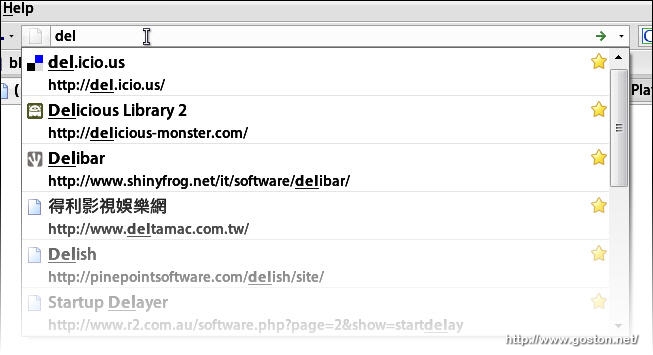
使用前, 在網址列輸入網址並不會自動補完搜尋結果的第一筆網址:
使用後, 會自動補完網址:
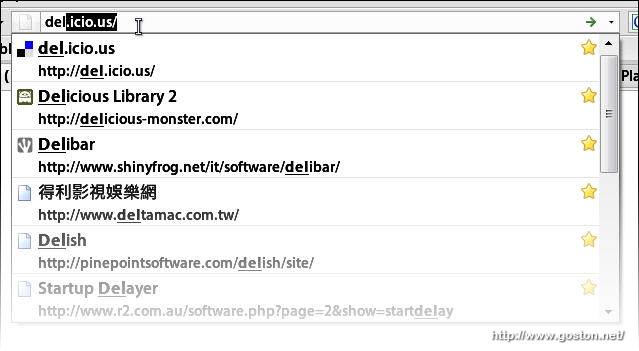
雖然不論是否補完網址, 使用者都可以直接按下 Enter 鍵造訪符合該關鍵字第一筆搜尋結果的網站, 但第二種呈現方式明顯較第一種呈現方式更清析、明瞭。

想達成第二種效果的做法很簡單:

  • 在網址列輸入「about:config
  • 於出現的頁面保證你不會將 Firefox 弄壞
  • 在「Filter」輸入「browser.urlbar.autoFill」, 並在下方的列表中將「browser.urlbar.autoFill」設為「true

 
以上, 一個小小小小的小技巧…

Technorati Tags: , ,

Entry Filed under: 軟體介紹, 軟體資訊, 電腦軟體

post to del.icio.us  post to MyShare  post to HEMiDEMi  post to funP

8 Comments Add your own

  • 1. shr  |  2008/07/17 00:57 | 回覆

    Firefox 3.0 預設在網址列輸入關鍵字後,直接按Enter應該不會造訪符合該關鍵字第一筆搜尋結果的網站吧!

    Using Mozilla Firefox Mozilla Firefox 3.0 on Windows Windows 2000
  • 2. George  |  2008/07/17 08:03 | 回覆

    @shr
    本來就會啊
    那不然這一篇寫來幹嘛?

    Using Mozilla Firefox Mozilla Firefox 3.0 on Windows Windows XP
  • 3. goston  |  2008/07/17 09:47 | 回覆

    @shr
    我這邊試的結果是會的哦…

    Using Mozilla Firefox Mozilla Firefox 3.0 on Windows Windows XP
  • 4. shr  |  2008/07/17 09:52 | 回覆

    我試過可攜版跟安裝版,都不行,奇怪!?

    Using Mozilla Firefox Mozilla Firefox 2.0.0.13 on Windows Windows XP
  • 5. goston  |  2008/07/17 10:18 | 回覆

    @shr
    試試看, 我這邊是打網址關鍵字會 (而且還必需從第一個字母就符合), 如果是其它關鍵字則不會…

    Using Mozilla Firefox Mozilla Firefox 3.0 on Windows Windows XP
  • 6. Eldorado Puzzle - 寻找&hellip  |  2008/07/18 18:39 | 回覆

    [...] 阿瓦童鞋曾经问我一个 firefox 问题,终于找到答案了:[FF] 小技巧 - 更清析、明了的地址栏自动完成功能。 [...]

    Using WordPress WordPress 2.6
  • 7. Sundance  |  2008/07/25 12:39 | 回覆

    @goston:

    @shr
    我這邊試的結果是會的哦…

    好像我按照上面的介紹修改之后還是無法自動完成?請問下怎么回事?我用的是FF3.01。

    Using Mozilla Firefox Mozilla Firefox 3.0.1 on Windows Windows XP
  • 8. Eldorado Puzzle - 寻找&hellip  |  2008/07/30 06:29 | 回覆

    [...] P.s.2 阿瓦童鞋曾经问我一个 firefox 问题,终于找到答案了:[FF] 小技巧 - 更清析、明了的地址栏自动完成功能。 [...]

    Using WordPress WordPress 2.3.3

Leave a Comment

Required

Required, hidden

Some HTML allowed:
<a href="" title=""> <abbr title=""> <acronym title=""> <b> <blockquote cite=""> <cite> <code> <del datetime=""> <em> <i> <q cite=""> <strike> <strong>

Trackback this post  |  Subscribe to the comments via RSS Feed


Donate Me

Related Posts

Recent Posts

Recent Comments