[Plugin] WP 官方統計外掛 - WordPress.com Stats


2007/05/09 15:09 1,240Views


有使用「WordPress.com」提供的 Blog 服務的人, 應該都對於 Dashboard 中的統計資料頁面不陌生。這個專為 WP 打造的統計程式, 除了可顯示過去 30 天來每天的「Page View」外, 還可以顯示「Referrers」、「Top Posts」、「Search Engine Terms」、「Incoming Links」等等對 Blog 經營者有用的資料。然而, 這支好用的程式一直沒有對外釋出, 使得許多自行架設「WordPress」的使用者都得另尋替代方案。
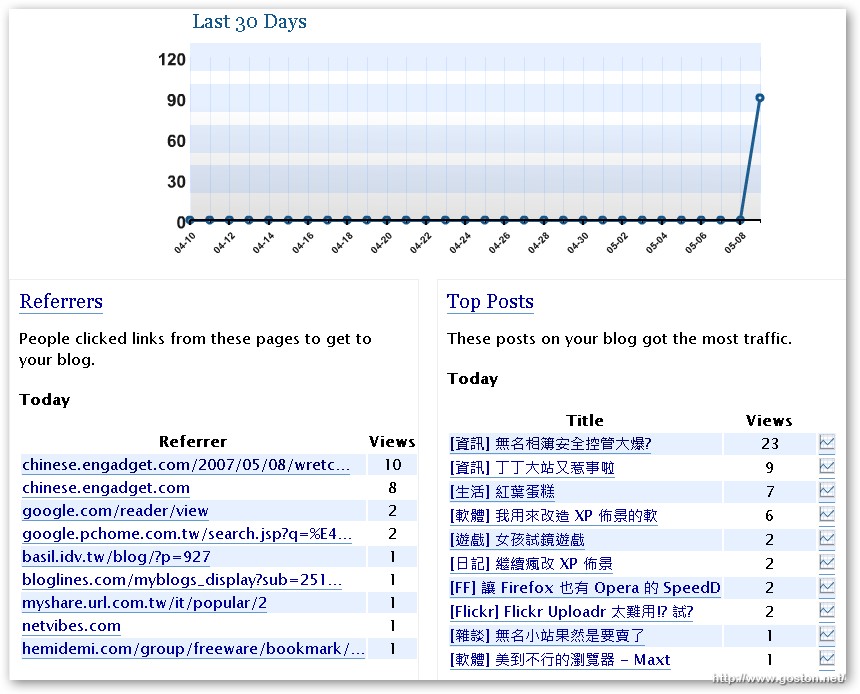
好消息是「WordPress.com」於前幾天將「WordPress.com Stats」這支統計程式釋出了。

要使用這支 Plugin 得先取得 WP 的 API Key, 所以要安裝的人得先註冊一個「WordPress.com」帳號, 然後登入管理後台的 User Profile 頁面便可查詢到自己的 API Key。(如果你有使用「Akismet」這支擋廣告外掛, 那麼你應該已經有 API Key 了)

有了 API Key 後, 就到「WordPress.com Stats」下載頁面將 Plugin 下載回來, 依一般安裝 Plugin 的方式安裝、啟動 Plugin, 然後填入 API Key 即可。

值得注意的是所有的統計資料都是存在「WordPress.com」中, 這種做法有好有壞, 好處是使用者端不必維護統計資料, 因此對於主機的負擔能減少些, 壞處自然就是隱私的問題啦! 所以如果你非常在意隱私問題, 就得好好衡量一下要不要使用這支 Plugin 囉!

延伸閱讀:

相關連結:

Technorati Tags: ,

Entry Filed under: 部落格, 部落格新玩意

post to del.icio.us  post to MyShare  post to HEMiDEMi  post to funP

4 Comments Add your own

  • 1. VicJuan’s 好人好&hellip  |  2007/05/09 18:12 | 回覆

    [...] 今天在Goston大大的文章中得知 前幾天Wordpress終於把官方的統計程式釋出了 名為Automattic Stats 如果是Wordpress.com的使用者 應該對Dashboard內的統計資料印象深刻 然而自行安裝Wordpress的使用者始終無緣使用這個統計程式 直到5/6官方釋出了這個外掛 我們才有幸得以使用這個好用的統計程式 使用這個外掛依然需要API key 不過如果已經有使用Akismet外掛的話 就能直接使用同樣的API key [...]

    Using WordPress WordPress 2.1.3
  • 2. 無法顯示網頁  |  2007/05/09 20:37 | 回覆

    我剛剛也把這個外掛給裝起來了,雖然目前還不知道實際的統計情形為何?
    不過 … 看介面應該不錯用才對。

    Using Internet Explorer Internet Explorer 7.0 on Windows Windows XP
  • 3. CoolPeter  |  2007/05/10 14:09 | 回覆

    感動耶~我之前都是靠Site Meter來得知這些訊息~ 現在馬上來裝裝看~ ^^

    Using Internet Explorer Internet Explorer 6.0 on Windows Windows XP
  • 4. SILENCE  |  2007/09/09 17:34 | 回覆

    這隻plugin採用 XMLRPC﹐向 wordpress.org 丟統計資料﹐傷腦筋的是﹐沒公佈 API﹐沒辦法將統計資訊放到前台 sidebar 裡面 :(
    若有解決辦法麻煩通知一下 :)

    另外﹐他時區採用 UTC﹐也就是到了早上八點才會變成 “yesterday” :~

    Using Mozilla Firefox Mozilla Firefox 2.0.0.6 on Windows Windows XP

Leave a Comment

Required

Required, hidden

Some HTML allowed:
<a href="" title=""> <abbr title=""> <acronym title=""> <b> <blockquote cite=""> <cite> <code> <del datetime=""> <em> <i> <q cite=""> <strike> <strong>

Trackback this post  |  Subscribe to the comments via RSS Feed


Donate Me

Related Posts

Recent Posts

Recent Comments