[軟體] 把 Vista 檔案總管位址列搬到 XP


2007/06/07 11:42 4,171Views


還記得之前介紹過用來強化檔案總管的「QT TabBar」嗎? 現在該軟體的作者又開發出了另一個強化檔案總管的好工具「QT Address Bar」。

「QT Address Bar」可以讓 XP 檔案總管的位址列變得和 Vista 一樣, 能利用下拉選單的方式選取目錄:
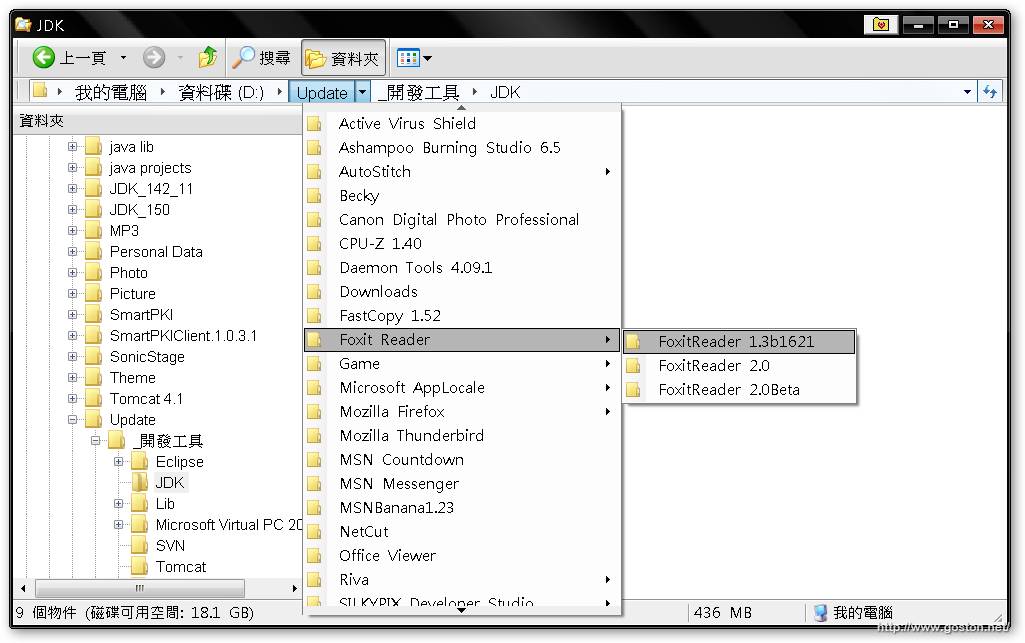
這個功能可是我在 Vista 上相當喜歡的功能之一, 想不到現在在 XP 上也能使用了!

對了, 安裝後記得把原本檔案總管的位址列隱藏起來, 改開啟「QT Address Bar」的位址列 (工具列按滑鼠右鍵就可以看到), 不要在原本的位址列點半天, 然後幹譙沒效用哦!

看到有愈來愈多 Vista 的功能被搬到 XP 上, Vista 的吸引力自然也就愈來愈小囉!

延伸閱讀:

相關連結:

Entry Filed under: 軟體介紹, 電腦軟體

post to del.icio.us  post to MyShare  post to HEMiDEMi  post to funP

1 Comment Add your own

  • 1. 大頭鼠  |  2007/06/07 13:23 | 回覆

    原來VISTA有此好用的功能,可減少資料夾跳躍的時間,開的速度又快,謝謝分享:)

    Using Mozilla Firefox Mozilla Firefox 2.0.0.4 on Windows Windows XP

Leave a Comment

Required

Required, hidden

Some HTML allowed:
<a href="" title=""> <abbr title=""> <acronym title=""> <b> <blockquote cite=""> <cite> <code> <del datetime=""> <em> <i> <q cite=""> <strike> <strong>

Trackback this post  |  Subscribe to the comments via RSS Feed


Donate Me

Related Posts

Recent Posts

Recent Comments