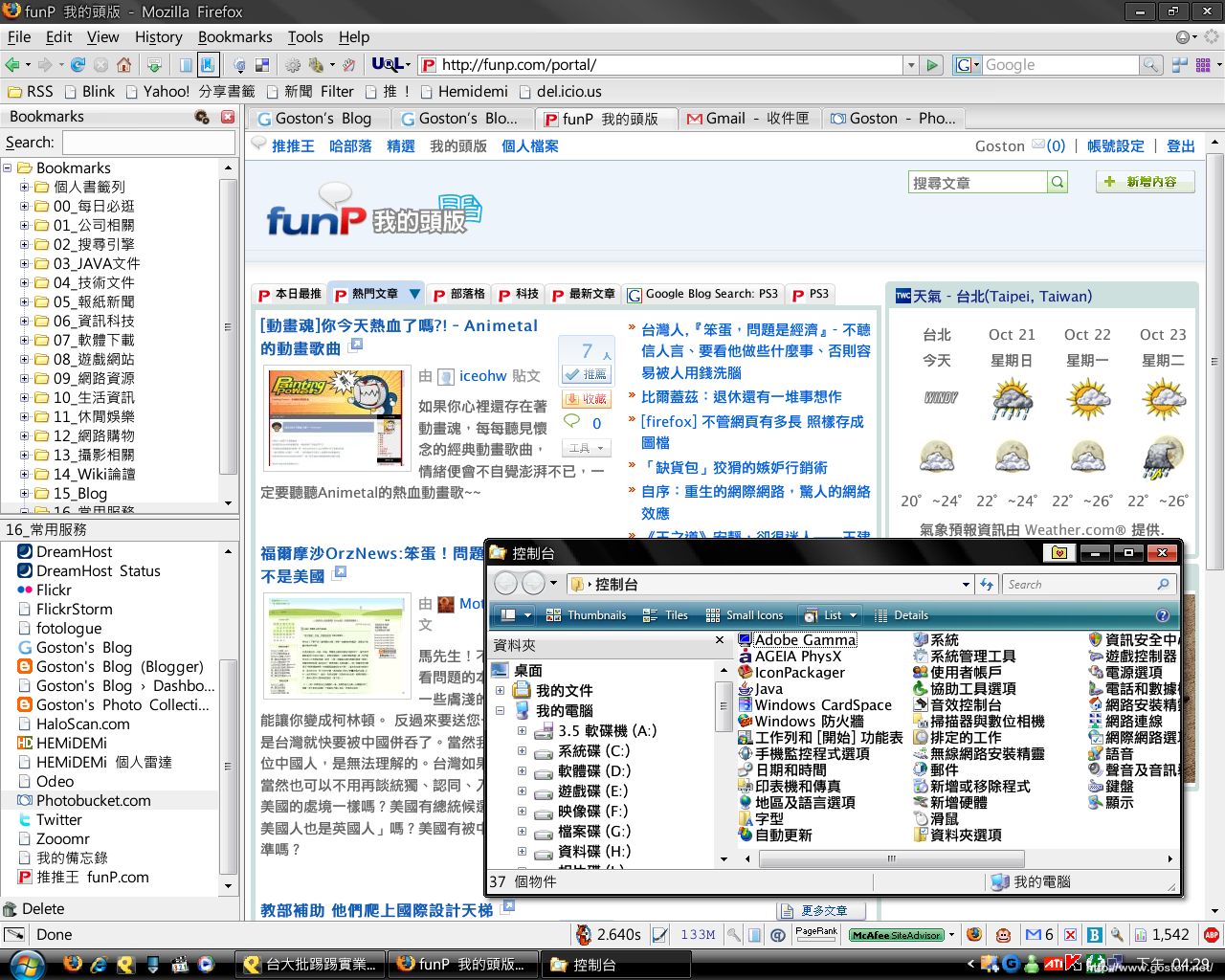
[生活] 我現在 XP 的佈景主題


2007/10/19 22:15 40,936 Views

透過下午介紹的「GDI++」微調了一個晚上, 總算調成自己滿意的樣子了:

這個佈景主題用蠻久了, 只是一直都找不到漂亮的字型來搭配它, 現在透過「GDI++」的幫助, 總算使桌面變得令人滿意了! 真是開心啊!

Entry Filed under: 日常生活, 生活雜記

post to del.icio.us  post to MyShare  post to HEMiDEMi  post to funP

34 Comments Add your own

  • 1. Chris  |  2007/10/19 23:18

    版大, 請問一下, 這個佈景主題是用那套軟體做出來的啊.

    Using Mozilla Firefox Mozilla Firefox 2.0.0.8 on Windows Windows XP
  • 2. goston  |  2007/10/19 23:24

    @Chris
    請參考: [軟體] 我用來改造 XP 佈景的軟體整理
    另外, 我現在用的 VisualStyle 是叫 Stolen

    Using Mozilla Firefox Mozilla Firefox 2.0.0.8 on Windows Windows XP
  • 3. appleseed  |  2007/10/19 23:28

    推一下~這樣看起來真的舒服很多哩!!

    那個字形是正黑體嗎?

    Using Mozilla Firefox Mozilla Firefox 2.0.0.8 on Mac OS Mac OS X
  • 4. goston  |  2007/10/19 23:30

    @appleseed
    是啊… 是微軟的正黑體沒錯… 本來是想用 MAC 的黑體字的, 結果發現微軟正黑體看起來也很不錯, 所以就直接用它了…

    Using Mozilla Firefox Mozilla Firefox 2.0.0.8 on Windows Windows XP
  • 5. Viewfinder  |  2007/10/20 20:19

    Goston兄換了圖了喔!
    原來網頁是Google的
    現在改成FUNP了

    Goston兄能分享一下微調的值嗎?
    我試著參考一個大陸網站調GDI++ ini檔的各個值,只知道Render weight與text tuning的值影響很大,但總是抓不到訣竅
    效果還不是很滿意…
    請Goston指點

    Using Mozilla Firefox Mozilla Firefox 2.0.0.8 on Windows Windows XP
  • 6. goston  |  2007/10/20 21:56

    @Viewfinder
    微調值好像要依螢幕去設, 我公司用的 EIZO L557 和家裏的 EIZO L768 兩台最佳設定值不太相同…

    下面是我細的設定值:

    HookChildProcesses=0
    HintingMode=1
    AntiAliasMode=1
    MaxHeight=150
    FontLoader=0
    FontSubstitutes=2
    GammaMode=0
    GammaValue=1.4
    RenderWeight=1.1
    Contrast=1.4
    TextTuning=-1
    TextTuningR=1
    TextTuningG=1
    TextTuningB=1
    NormalWeight=4
    BoldWeight=0
    ItalicSlant=0
    LcdFilter=1

    Using Mozilla Firefox Mozilla Firefox 2.0.0.8 on Windows Windows XP
  • 7. Viewfinder  |  2007/10/20 22:46

    這是我的設定值
    大家可以參考
    HookChildProcesses=1
    HintingMode=2
    AntiAliasMode=4
    MaxHeight=150
    FontLoader=0
    FontSubstitutes=2
    GammaMode=0
    GammaValue=1.2
    RenderWeight=1.4
    Contrast=1.4
    TextTuning=2
    TextTuningR=2
    TextTuningG=1
    TextTuningB=1
    NormalWeight=6
    BoldWeight=5
    ItalicSlant=0
    LcdFilter=2

    Using Mozilla Firefox Mozilla Firefox 2.0.0.8 on Windows Windows XP
  • 8. emisjerry  |  2007/10/21 00:37

    請問細明體&新細明體應該如何替換? 用如下設定但字體仍是破碎的:
    [General]
    FontSubstitutes=1

    [FontSubstitutes]
    新細明體=SimSun
    細明體=SimSun

    Using Mozilla Firefox Mozilla Firefox 2.0.0.8 on Windows Windows Server 2003
  • 9. Alex  |  2007/10/21 08:16

    請問一下G大
    怎麼改系統字型改為微軟的正黑體?
    改完以後很美 ~~^^
    3Q~~

    Using Mozilla Firefox Mozilla Firefox 2.0.0.8 on Windows Windows XP
  • 10. goston  |  2007/10/21 12:15

    @emisjerry

    [General]
    FontSubstitutes=2

    [Exclude]
    #細明體
    #新細明體
    #標楷體

    [FontSubstitutes]
    細明體=Apple LiHei Pro
    新細明體=Apple LiHei Pro
    標楷體=Apple LiHei Pro

    @Alex

    找一套叫做 SFC 的程式,
    然後開啟 VisualStyle 的 .msstyles 檔,
    把裏面的字型換掉存檔, 之後再套用該 VisualStyle 即可…

    Using Mozilla Firefox Mozilla Firefox 2.0.0.8 on Windows Windows XP
  • 11. xyz  |  2007/10/21 16:32

    路人:
    恕我直言,看起來滿醜的…

    Using Internet Explorer Internet Explorer 7.0 on Windows Windows Vista
  • 12. goston  |  2007/10/21 22:20

    @xyz
    各有所好囉… :)

    Using Mozilla Firefox Mozilla Firefox 2.0.0.8 on Windows Windows XP
  • 13. emisjerry  |  2007/10/21 23:02

    Dear Goston,

    我找到問題癥結了:gdi++.ini的檔案格式必須是UTF-16 LE才會正確。

    [Exclude]裡的#號視同註解,是不需要的;[Exclude]與[FontSubstitutes]二者不必同時存在。詳見:補遺:[軟體] 超強 Windows 字型美化軟體 – GDI++

    Using Mozilla Firefox Mozilla Firefox 2.0.0.7 on Windows Windows Server 2003
  • 14. 浩  |  2007/10/22 00:27

    我視窗的標題列會變成這樣
    http://aycu38.webshots.com/image/31597/2004977247083612309_rs.jpg
    電腦是vista 所以應該原本是微軟正黑體才對
    要怎麼調整呢?

    Using Mozilla Firefox Mozilla Firefox 2.0.0.7 on Windows Windows Vista
  • 15. timeternity  |  2007/10/23 13:20

    請問一下… 為什麼內建的細明體、新細明體、標楷體為什麼會亂掉呢?

    我之所以會有這種疑問就是…xp 內建的字型,字的數目是最齊的,其他字體雖然好看,但很多 unicode 的字體都有缺字…
    難道沒辦法用 xp 內建的字體嗎……

    Using Mozilla Firefox Mozilla Firefox 2.0.0.8 on Windows Windows XP
  • 16. goston  |  2007/10/23 13:50

    @timeternity
    為什麼會亂掉我不知道, 不過可以改用微軟正黑體…

    Using Mozilla Firefox Mozilla Firefox 2.0.0.8 on Windows Windows XP
  • 17. timeternity  |  2007/10/23 19:27

    我後來用正黑體就 ok 了,謝謝您
    看起來確實蠻漂亮的

    只不過 GDI++ 打開以後電腦慢很多 Orz
    慢到沒辦法接受
    是不是有一些辦法可以讓 GDI++ 提昇效能?
    還是因為我哪邊設定忘了設了?

    平常 firefox 分頁就開了一堆了,GDI++ 打開以後幾乎不能動了

    另外就是,用 parsing 的方式比用 gditray 的方式更吃資源、更慢

    還有就是網頁上某些字會變瘦 囧
    像:內、檔
    這個是為什麼呢?

    ps.電腦配備是 C2D E6320 @ 2.8G、1G ram、8500GT、萬轉暴龍

    Using Mozilla Firefox Mozilla Firefox 2.0.0.8 on Windows Windows XP
  • 18. william  |  2007/10/27 22:11

    怎樣弄的 ? 我弄不到 …….

    Using Mozilla Firefox Mozilla Firefox 2.0.0.7 on Windows Windows XP
  • 19. william  |  2007/10/29 17:45

    我的xp佈景主題~!
    http://farm3.static.flickr.com/2160/1786413005_ddc1de87cc_o.png
    http://farm3.static.flickr.com/2226/1787191760_290d5dfe36_o.png
    http://farm3.static.flickr.com/2052/1786198003_9c529c0aa9_o.png
    http://farm3.static.flickr.com/2250/1787194986_61eaa14db9_o.png
    O
    / | \/
    / \

    Using Mozilla Firefox Mozilla Firefox 2.0.0.7 on Windows Windows XP
  • 20. adrianmak  |  2007/11/03 17:48

    其實
    細明體
    新細明體
    標楷體

    各代表什麼英文字體名?
    我的xp 是英語的所以看不到中文名的字體.

    Using Mozilla Firefox Mozilla Firefox 2.0.0.9 on Windows Windows XP
  • 21. adrianmak  |  2007/11/03 19:11

    另外file explorer 內的日文,中文好像不生效

    http://i108.photobucket.com/albums/n16/adrianmak/Snap1-122.jpg

    是什麼問題?

    Using Mozilla Firefox Mozilla Firefox 2.0.0.9 on Windows Windows XP
  • 22. Leo  |  2007/11/05 18:40

    想問一下apple lihei pro 能在哪裡下~~~?

    Using Unbranded Firefox Unbranded Firefox 2.0.0.8 on Windows Windows XP
  • 23. goston  |  2007/11/05 21:13

    @Leo
    Google

    Using Mozilla Firefox Mozilla Firefox 2.0.0.9 on Windows Windows XP
  • 24. ISO6099  |  2007/11/06 02:35

    william 大大我好想要你改的vista 佈景主題唷
    方便可以傳給我嗎?
    iso6099@yahoo.com.tw

    Using Internet Explorer Internet Explorer 7.0 on Windows Windows XP
  • 25. ISO6099  |  2007/11/06 03:00

    我不會虧待您的~放心
    有施必有得!!
    希望你有空可以傳給我唷!
    感恩呀

    Using Internet Explorer Internet Explorer 7.0 on Windows Windows XP
  • 26. Leo  |  2007/11/06 15:18

    想問一下sfc的程式可在哪找?
    google找sfc全都是無關的=_____=
    3qqq~~

    Using Unbranded Firefox Unbranded Firefox 2.0.0.8 on Windows Windows XP
  • 27. alias  |  2007/12/16 14:38

    各位先進好,有些問題想請教一下,當執行
    gdi++一斷時間之後有些程式無法開啟
    不曉得是什麼問題? 比如』我的電腦>內容』就無法開啟系統內容

    煩請指教嚕 謝謝~~~

    Using Mozilla Firefox Mozilla Firefox 2.0.0.11 on Windows Windows XP
  • 28. william  |  2007/12/25 11:08

    我的新XP主題 :

    http://farm3.static.flickr.com/2329/2134717502_d9a6edcb9d_o.png

    http://farm3.static.flickr.com/2114/2134717500_ea82519713_o.png

    Using Mozilla Firefox Mozilla Firefox 2.0.0.11 on Windows Windows XP
  • 29. goston  |  2007/12/25 11:38

    @william
    看起來感覺很棒啊!

    Using Mozilla Firefox Mozilla Firefox 2.0.0.11 on Windows Windows XP
  • 30. andy  |  2008/01/07 15:41

    謝謝 goston 提供的』我用來改造 XP 佈景的軟體整理』
    很漂亮~

    @william
    http://farm3.static.flickr.com/2329/2134717502_d9a6edcb9d_o.png
    http://farm3.static.flickr.com/2114/2134717500_ea82519713_o.png
    能提供在哪下載嗎? deviantART\VisualStyle\???
    謝謝~

    Using Internet Explorer Internet Explorer 7.0 on Windows Windows XP
  • 31. andy  |  2008/01/07 15:48

    謝謝 goston 提供』[軟體] 我用來改造 XP 佈景的軟體整理』
    桌面變的簡潔漂亮~

    Using Internet Explorer Internet Explorer 7.0 on Windows Windows XP
  • 32. chung  |  2009/05/08 10:00

    您好~~
    我想請問一下 開始鍵如何將原本的開始圖形
    轉換成你那一顆球的圖型呢
    要用哪一套軟體來辦到呢
    謝謝

    Using Internet Explorer Internet Explorer 6.0 on Windows Windows XP
  • 33. goston  |  2009/05/08 11:04

    @chung
    這是我本身使用的 Visual Style 就這樣設計…

    Using Mozilla Firefox Mozilla Firefox 3.5b4 on Windows Windows XP
  • 34. 訪客  |  2009/08/05 15:04

    @xyz

    你TMD的也挺靠北的:-)

    Using Internet Explorer Internet Explorer 7.0 on Windows Windows XP

Leave a Comment

Required

Required, hidden

Some HTML allowed:
<a href="" title=""> <abbr title=""> <acronym title=""> <b> <blockquote cite=""> <cite> <code> <del datetime=""> <em> <i> <q cite=""> <strike> <strong>

Trackback this post  |  Subscribe to the comments via RSS Feed


Donate Me

Related Posts

Recent Posts

Recent Comments