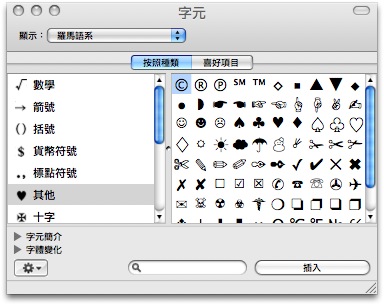
電腦軟體, 軟體資訊, 軟體介紹, MAC、iOS 軟體 [MAC] 小技巧 – 快速輸入各式特殊符號 Posted by Goston on 2008/10/142008/10/14 - 55,143 views 打報告或上網發表文章時遇到想輸入特殊符號卻不知怎麼打嗎? 這時只要按下「 command + option + T 」就會出現字元面板供使用者點選輸入符號了: 目前不確定是否所有的符號都是 Unicode 字元, 但我隨意試了十幾個符號都能在 Windows 上正確顯示就是了。 這個功能可在「系統偏好設定」下「鍵盤與滑鼠」項目中的「鍵盤快速鍵」中找到, 但我一直沒發現這功能, 因此很感謝網友「jiroro」告知這個實用的小技巧。 Click to share on Twitter (Opens in new window)Click to share on Facebook (Opens in new window)Click to share on Tumblr (Opens in new window)Click to share on Pinterest (Opens in new window)Click to share on Pocket (Opens in new window)
MAC這個作業系統,是不是要先下載後執行,才會有這些好用的符號圖案,電腦白痴使用會很容易嗎?
@lyato
這是 Mac OS 的內建功能, 不需另外下載…
至於 Mac OS 好不好用就是見仁見智的問題了, 個人是認為比 XP / VISTA 好用…
試試看囉~~
很多符號都不會打說!!
我的鍵盤中”冒號,分號“的鍵盤不聽使
可以教我
可是在Numbers里面按「command + option + T」就成了Hide Toolbar!!!
不能用!!!!!!!!!!!
你這是 windows 7 字元嗎?
command + option + T 赞一个啊!~今天急需用mac特殊符号就是不知道怎么键入,这下学习了!~