我相信多數人要在 Mac 上面安裝 Windows 都還是使用 Mac OSX 中的 Boot Camp 來切割安裝 Windows 的磁區,然而使用 Boot Camp 來安裝 Windows 的最大缺點就是得耍一點小技巧才能讓 Windows 擁有多個磁碟槽。
今天我要講的是不使用 Boot Camp 安裝 Windows 7 並讓 Windows 7 環境下擁有多個磁碟槽可用的方法,這方法簡單到讓人想哭,真的!
首先先看完成後的結果吧!我在 Windows 7 底下擁有兩個 NTFS 磁區,一個用來安裝系統及軟體,另一槽用來存放資料,而圖中的 HFS 則是 Mac OSX 所在的磁區。
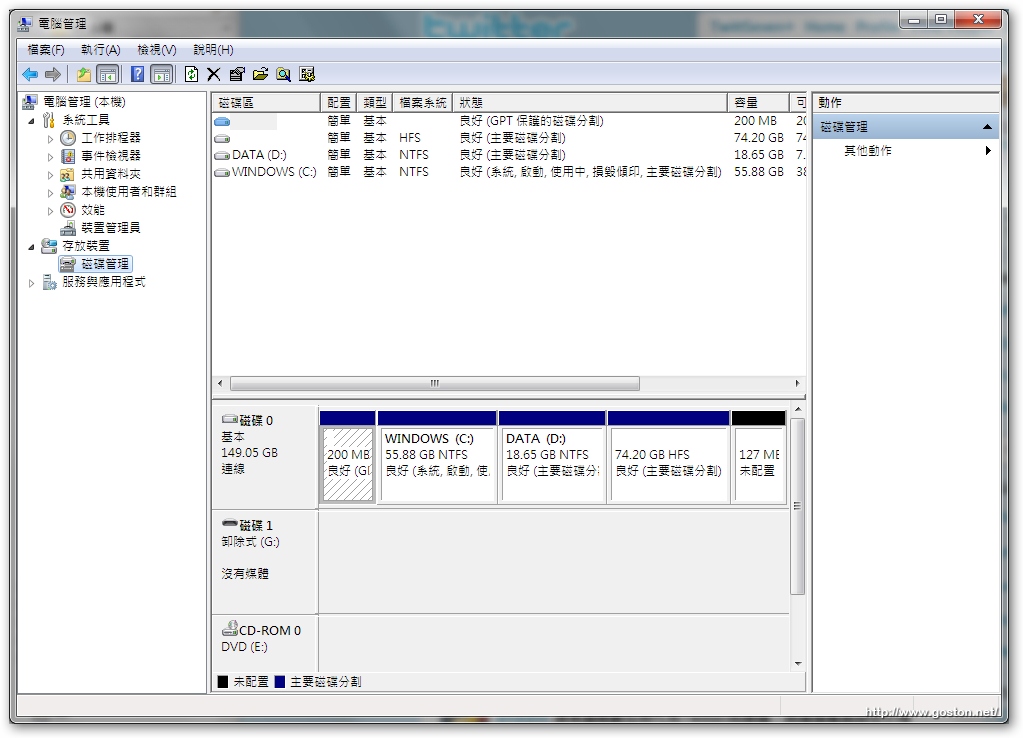
方法很簡單:
- 利用 Mac OSX 的安裝光碟開機,並執行磁碟工具程式來切割硬碟
- 以我的例子來說,我需要兩個 NTFS 磁區及一個安裝 Mac OSX 的磁區,所以我切割了兩個 FAT 磁區及一個 OSX 檔案系統的磁區
- 重點:把要安裝 Mac OSX 的磁區放在最後一個
- 另外 Partition Table 記得維持在 GUID,而不要選為 MBR
- 切割完後用 Windows 7 安裝光碟開機進行 Windows 7 的安裝,安裝過程中會看到一個 200MB 的 GPT protective partition,千萬別把它刪除,也就是說安裝過程中不要刪除任何磁區
- 接著將要安裝 Windows 7 的磁區重新格式化成所需的格式(一定要重新格式化,這點和用 Boot Camp 安裝時一樣)
- 接著依正常方式安裝 Windows 7,完成後放入 Mac OSX 安裝光碟安裝 Windows 下的驅動程式(和用 Boot Camp 安裝時一樣)
- 一個擁有多個磁區的 Windows 7 系統完成!
以後要選擇作業系統就和之前以 Boot Camp 安裝時一樣,在開機時按住「
Option
」鍵即可選擇。
好啦!很簡單的教學,有問題的再提出來吧。
補充:如果你是已經有在使用 Mac OSX 而想安裝 Windows 7 的話,請利用 Mac OSX 光碟開機進入磁碟工具程式調整 Mac OSX 所在磁區的大小(注意:這項調整並不會把原本的 Mac OSX 洗掉,除非你操作錯誤),並加入 Windows 所需的分割區數量(不要超過 3 個,原因請 Google:「Windows 7 Primary Partition」)及設定其大小,完成後參考上面第 5 點開始安裝 Windows 7 即可。
延伸閱讀:
請問,那接下來mac os x要怎麼安裝呢?
@TYCoon
Mac OSX 光碟開機,裝在切出來的 HFS 磁區即可。
我是用windows7的壓縮磁碟功能,讓windows7有C和D碟
用正常Boot Camp方式安裝Win7之後,可以用免費軟體Partition Wizard去切Win7嗎?1. 不知道能不能切? 2. 就算真的給切,開機選單會不會錯亂?
請問切割完兩個 FAT 磁區及一個 OSX 檔案系統的磁區之後,如何取出mac安裝光碟換回wins 7光碟?按了很多遍取出光碟按鍵也沒有彈出
@charles
開機時按住觸控板或滑鼠左鍵不放…
I wish I had a Mac….
另外Partition Table記得維持在GUID,而不要選為MBR <-請問這個的選項在哪呢? 謝謝!
安裝好win 7之後, 放入MacOS光碟重開機, 還是 win 7開機, 關机再開机或開机時按C鍵, 都還是 win 7開機?
鍵盤是win pc, 但當HD是空白時, MacOS光碟開機是正常的。HD磁區全都未更動, 請幫忙,感謝!
@lin
開機時按住 Option 鍵不放看看光碟片的選項有沒有出來。
我的是2010 mac mini,已經有預裝os x,我需要重新刪除磁區,重新分割後裝完win7,再重裝os x嗎 ? 這樣的分割方式,如果以後os x重灌時,會不會有影響?
使用windows7的壓縮磁碟功能,會不會造成無法開機?
@simon
應該不至於無法開機,那只是系統對檔案進行壓縮而已~
@goston
那用boot camp安裝win7後,再win7執行壓縮磁碟功能,分成C、D二個磁區是可行的囉?
@Simon Hsu
抱歉,我沒有用 Boot Camp 輔助程式安裝過 Windows 7,另外也不確定在 Windows 中進行磁碟分割會不會去動到 Partition Table 的格式,這方面你要 Google 一下,我不研究 Windows 很久了。
@goston
謝謝你的回答,我也是google了半天得不到答案,可能要自已親自試試看了><
@goston,我試成功了><
http://www.mobile01.com/topicdetail.php?f=480&t=1657608&p=1#20991725
按照您介紹的方法,贏得和獅子都安裝成功,可是發現在WinPE的下備份取勝,恢復以後無法啟動,我想諮詢您有沒有什麼備份系統方法,最好是GHOST備份雙贏,有辦法嗎?
或者說這麼安裝贏系統怎麼重裝呢?,重裝系統會破壞啟動程序嗎?
謝謝您
@zhanglei
Ghost 你要查查支不支援 EFI 啟動,不支援的話備出來是無法開機的,要備可以試試 True Image,不過要買有支援 EFI 開機的版本。
另外,重裝系統只要你沒亂動 Partation 就不會破壞到啟動功能。
首先感謝您的分享,但小弟有一疑問,以這樣子分割完後,要先安裝Win7還是MacOS呢?還是沒有差別呢?版主有測試過以這種分割安裝雙系統後,用久了會不會出現什麼問題?例如MacOS或Win7開機越來越慢的情況,或系統出現任何問題之類的?
@Fenfan
先裝哪個 OS 都沒差~
另外,我從 2008 年初接觸到 Mac 以來都是這樣用~ 基本上會不會遇到問題和人比較有關~
如果先裝哪個OS都沒差的話,是不是我完全不分割mac的磁區也可以,這樣整台就是windows 7了?
@Wei-Yu
可以整台都 Windows 沒錯。
請問有說到切2個Fat格式,安裝Win7時再格式化成ntfs
等進入Win7後就可以對另一個空的Fat做D槽的分割,目前對嗎??
那接下來如果是開機進入MAC,可以對那個D槽做檔案的共享,讀取與寫入嗎???
我想你是指進入 Win 7 後對另一個空的槽 Format
答案是 Yes
小弟不才,照著切割硬碟全數成功,接著想試著合併卻全數失敗了。
一直是在recoveryHD的硬碟上做合併切割的動作,
然系統卻始終回覆我:
切割失敗,XXXX
無法卸載硬碟。
請問合併切割要怎執行成功?
還想請教幾個,
USB安裝 MAC OSX 要怎麼做重灌的動作?
我在recovery hd裡選擇重新安裝 OS X在隨身碟裡,
接著等了兩三小時完成後,重新開機選擇隨身碟,
他竟然開機了…那此時我應該要去哪裡修正我硬碟多餘的切割???
硬碟多餘的切割是好的嗎?
現階段BOOTCAMP5.0是怎麼被評價的?
想請教一下,用這個方法安裝的win7,能加進parallels裡面嗎