[軟體] 免費也有好東西 - PSPad


2007/04/24 09:27 6,468Views


我相信多數使用 Windows 的人在電腦中, 除了微軟本身內附的「記事本」外, 應該都會另外安裝一套文字編輯軟體吧!

如果你的電腦中有另外安裝文字編輯軟體, 那麼我想問的是:「你侵權的使用 UltraEdit 多久了!?」

認識我的人都知道我是個自由軟體愛用者, 只要我需要的軟體在自由軟體中能找到合用且順手的解決方案, 我就不會去使用商業軟體。對於文字編輯軟體, 我要推薦給大家一套我用了很長一段時間的「PSPad」。

「PSPad」是一套功能不輸給「UltraEdit」等商業軟體的 Freeware, 雖然官方網站將它的使用者定位在程式設計師, 但「PSPad」其實也相當適合一般使用者。
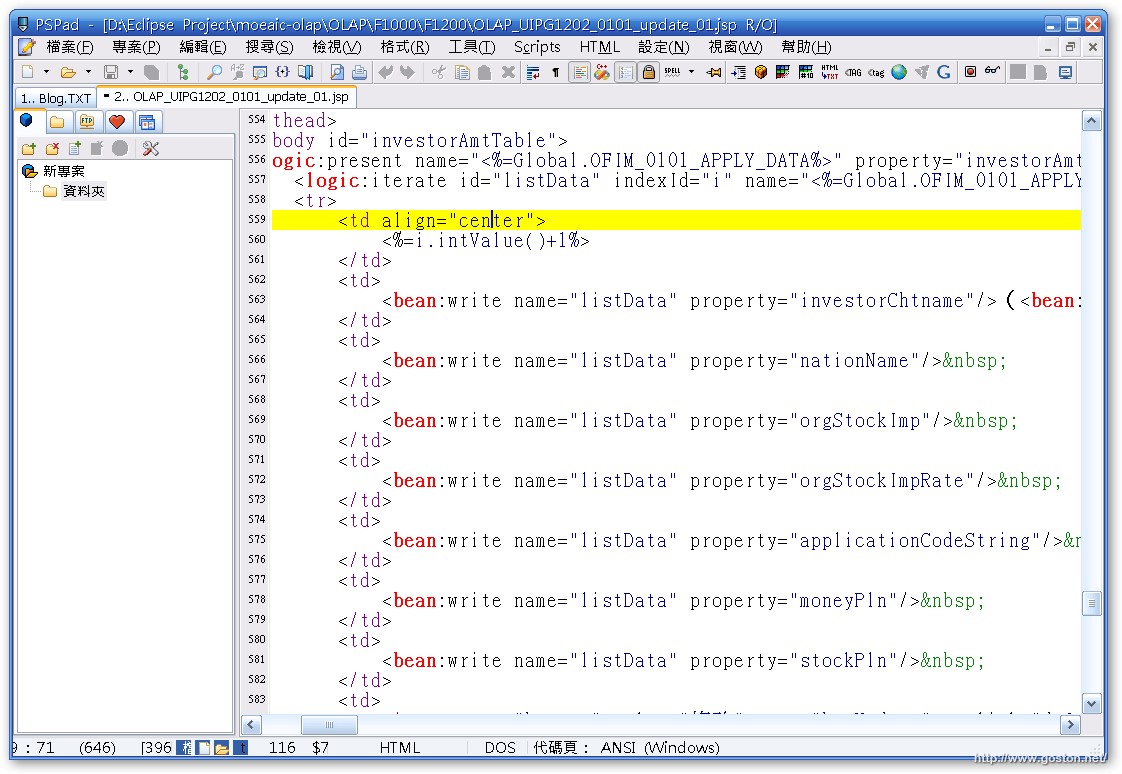
「PSPad」的幾項重要特色如下:

  • 支援 Unicode
  • 多國語系介面 - 包含了繁體及簡體中文的支援
  • 支援分頁 - 開一堆檔案也不怕
  • 程式語法高亮度顯示 - 個人認為「PSPad」的語法高亮度顯示功能比「UltraEdit」更精確好用
  • FTP 功能 - 讓你直接編輯遠端 FTP 的文件
  • 支援 Session - 啟動時可直接開啟上次編輯的文件 (對我而言很重要的功能)
  • 檔案比對 - 可比對兩個檔案內容的差異
  • 支援 HEX 編輯
  • 支援巨集 - 可將常做的一連串動作錄成巨集檔, 以後要使用時只要播放該巨集檔就可執行完成
  • 支援 HTML 驗證及排版
  • 支援正規表示式 - 在某些情況下, 這功能很好用
  • 內建 Google 搜尋 - 編輯文章時, 臨時想查 Google!?「PSPad」允許你直接選取文件中的任意字詞直接送到 Google 中做搜尋
  • 支援多項開發網頁及程式時會用到的小工具 - 例如: ASCII 字碼表、色彩格式轉換器等等
  • 支援 Extensions, 可擴充軟體功能

 
廢話不多說, 趕快去試試這套強大好用的文字編輯軟體吧!

相關連結:

Technorati Tags:

Entry Filed under: 軟體介紹, 電腦軟體

post to del.icio.us  post to MyShare  post to HEMiDEMi  post to funP

20 Comments Add your own

  • 1. 路人  |  2007/04/24 09:49 | 回覆

    沒錯沒錯, 我也覺的PSPad的highlight真的很好用, 而且支援的語言也多 :)

    Using Internet Explorer Internet Explorer 6.0 on Windows Windows 2000
  • 2. bbk  |  2007/04/24 10:10 | 回覆

    感謝分享這個好用的軟體!!
    你文章中的某一段話還寫的中肯…XDXD

    Using Internet Explorer Internet Explorer 6.0 on Windows Windows XP
  • 3. Kirin Lin  |  2007/04/24 10:13 | 回覆

    自從 Kirin 發現它與 NotePad++ 之後,就不用 UltraEdit 了!這應該是四年前的事情…

    Using Mozilla Firefox Mozilla Firefox 2.0.0.3 on Windows Windows XP
  • 4. John  |  2007/04/24 11:07 | 回覆

    進階題:「你侵權的使用 Windows XP 多久了!?」

    Using Internet Explorer Internet Explorer 7.0 on Windows Windows XP
  • 5. goston  |  2007/04/24 11:22 | 回覆

    @John
    很不巧的… 並沒有… NB 的就不說了都會附, 桌機的嘛… 呵呵…

    http://www.goston.net/2005/06/02/94/

    Using Mozilla Firefox Mozilla Firefox 2.0.0.3 on Windows Windows XP
  • 6. xzonisy  |  2007/04/24 11:42 | 回覆

    其實我會換到 PSPAD 是因為它可以利用 FTP 線上編輯,這對我編輯 CSS 有很大幫助 :D

    不然我覺得我使用 NOTEPAD++ 或者是 NOTEPAD2 就很足夠。

    Using Mozilla Firefox Mozilla Firefox 2.0.0.3 on Windows Windows XP
  • 7. Nike小周  |  2007/04/24 16:17 | 回覆

    我眼花了嗎?
    圖片中的code…有點像Struts耶~
    我看到Struts的tld…

    PSPAD好久沒用了,現在都用NetBeans IDE,也是Free的,滿肥大、耗資源的,不過真的很好用!而且有繁體中文版真是不用可惜~

    Using Unbranded Firefox Unbranded Firefox 2.0.0.3 on Windows Windows 2000
  • 8. goston  |  2007/04/24 16:33 | 回覆

    @Nike小周
    是 Struts 沒錯啊… 我目前是用 Spring + Struts 來開發專案的… IDE 是用 Eclipse, JSP 網頁的部份則是用 PSPad … 其實 Eclipse 耗的資源也不是個省油的燈…

    Using Mozilla Firefox Mozilla Firefox 2.0.0.3 on Windows Windows XP
  • 9. Shardad  |  2007/04/24 19:38 | 回覆

    PSPad蠻不錯的,用了一陣子。現在又回到老環境:cygwin + gvim

    Using Mozilla Firefox Mozilla Firefox 2.0.0.3 on Windows Windows XP
  • 10. zinklink  |  2007/04/25 03:23 | 回覆

    Notepad++ 也很不錯 由國人所開發軟體,也支援不少程式語言的標記

    Using Mozilla Firefox Mozilla Firefox 2.0.0.3 on Ubuntu Linux Ubuntu Linux
  • 11. goston  |  2007/04/25 10:10 | 回覆

    @zinklink
    Notepad++ 我電腦中也有安裝, 不過大多數時候我還是都使用 PSPad, 因為 Notepad++ 的 UI 太不合我胃口了… XD

    Using Mozilla Firefox Mozilla Firefox 2.0.0.3 on Windows Windows XP
  • 12. Nike小周  |  2007/04/25 12:38 | 回覆

    Eclipse之前小小試用過,不過總是要自己去找一堆plugins就很吐血…

    所以才選用NetBeans,目前公司內部專案我都是用struts+ejb+jboss(AP),只需要用一套NetBeans就全部打死了…

    至於有時需要”右鍵”開記事本的部份我是使用”小巧”的Notepad2把WINDOWS”內建”的Notepad取代掉~

    Using Unbranded Firefox Unbranded Firefox 2.0.0.3 on Windows Windows 2000
  • 13. goston  |  2007/04/25 12:51 | 回覆

    @Nike小周
    Eclipse要裝一堆 Plugin 的確很令人吐血, 所以我是花點小錢去買 MyEclipse 這個人家整合好 plugin 的軟體… :P

    至於 EJB, 我要是用上的話, 以我們這邊的水準, 應該沒幾個人看得懂吧! (小聲)

    Using Mozilla Firefox Mozilla Firefox 2.0.0.3 on Windows Windows XP
  • 14. too  |  2007/05/03 22:47 | 回覆

    最可惜的是PSPAD不能像EMEDITOR那樣支援雙擊滑鼠就直接開啟網址!
    要不然就是我還沒找到如何啟動那項功能!

    Using Internet Explorer Internet Explorer 6.0 on Windows Windows XP
  • 15. goston  |  2007/05/04 08:55 | 回覆

    @too
    我也沒找到雙擊就開網址的功能, 不過由於我不太需要這功能, 所以也還好… 或許你可以 MAIL 給原開發者, 叫他加入哦… :D

    Using Mozilla Firefox Mozilla Firefox 2.0.0.3 on Windows Windows XP
  • 16. CHiDo  |  2007/10/01 10:14 | 回覆

    PSPad要開網址,是按住Ctrl並點擊該網址。

    Using Mozilla Firefox Mozilla Firefox 2.0.0.7 on Windows Windows XP
  • 17. Yeats  |  2007/10/31 16:42 | 回覆

    請問一下
    我安裝了Pspad 4.5.2 版
    他預設對於asp 和 jsp 的高亮度並沒有支援…
    是不是藥量外設定or 安裝plug-in
    像是 UltraEdit 可以改worfile.txt 一樣
    謝謝

    Using Internet Explorer Internet Explorer 6.0 on Windows Windows XP
  • 18. goston  |  2007/10/31 19:07 | 回覆

    @Yeats
    選項設定中的多重語法高亮度這項設一設吧…

    Using Mozilla Firefox Mozilla Firefox 2.0.0.8 on Windows Windows XP
  • 19. chris  |  2007/11/23 11:55 | 回覆

    想問PSPad 有支援 Linux嗎?

    一直找不到PSPad Linux版本的!!

    在linux沒PSPad 不知道該怎麼寫程式

    真不習慣!

    Using Internet Explorer Internet Explorer 6.0 on Windows Windows XP
  • 20. goston  |  2007/11/23 22:28 | 回覆

    @chris
    沒有耶… 不過 Linux 有 Eclipse 啊..
    不然可以試試 JEdit

    Using Mozilla Firefox Mozilla Firefox 2.0.0.9 on Windows Windows XP

Leave a Comment

Required

Required, hidden

Some HTML allowed:
<a href="" title=""> <abbr title=""> <acronym title=""> <b> <blockquote cite=""> <cite> <code> <del datetime=""> <em> <i> <q cite=""> <strike> <strong>

Trackback this post  |  Subscribe to the comments via RSS Feed


Donate Me

Related Posts

Recent Posts

Recent Comments