[FF] 上下傳 Flickr、Picasa、YouTube 的檔案 – 方便強大的 Firefox Universal Uploader


2007/06/01 13:20 8,528 Views

今天挖到「Firefox Universal Uploader (以下簡稱「FireUploader」)」這個好物實在讓我太感動了 Q_Q, 所以迫不及待的就算犧牲午睡也要趕快的介紹給大家。
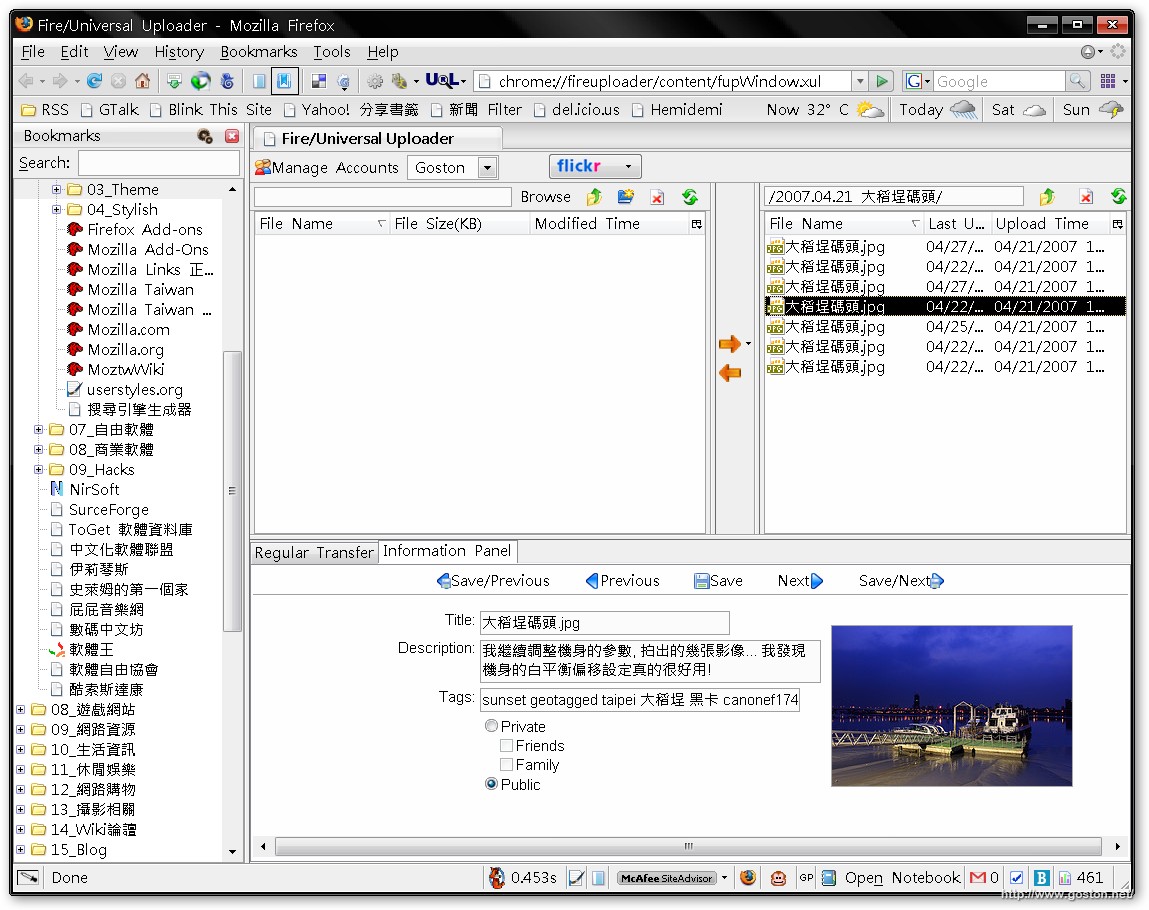

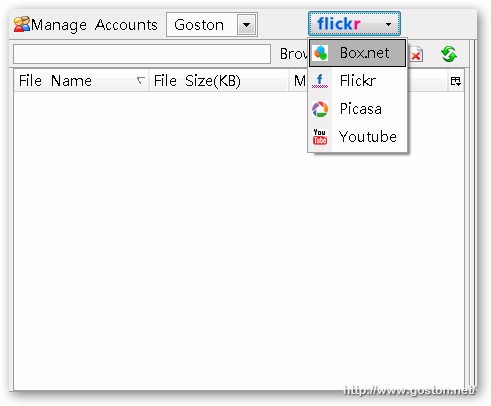
「FireUploader」是個讓你可以很方便的上、下傳檔案到一些知名 Web 2.0 網站的 Firefox 擴充套件。目前支援「Flickr」、「Picasa」、「YouTube」、「Box.net」:
那麼,「FireUploader」究竟有什麼好用的地方呢!? 以下就以「Flickr」為例做說明。

當你設定好「Flickr」帳號並登入後, 可以發現「FireUploader」的視窗分為了三大塊: 左邊的是用來顯示本地端檔案及目錄、右邊則是遠端的檔案、下方則是用來顯示傳輸進度及資訊看板。關於資訊看板以「Flickr」來說資訊看板就是讓你編輯相片的標題, 描述及設定權限之用。

注意到了嗎? 右方遠端檔案的地方居然有「目錄」的存在, 這個「目錄」就是你在「Flickr」所建立的「SET」, 點進去「目錄」後就可以看到在該「SET」的相片。「FireUploader」這種類似 Windows 檔案總管及 FTP 概念的設計, 讓上傳及備份相片變得很容易。
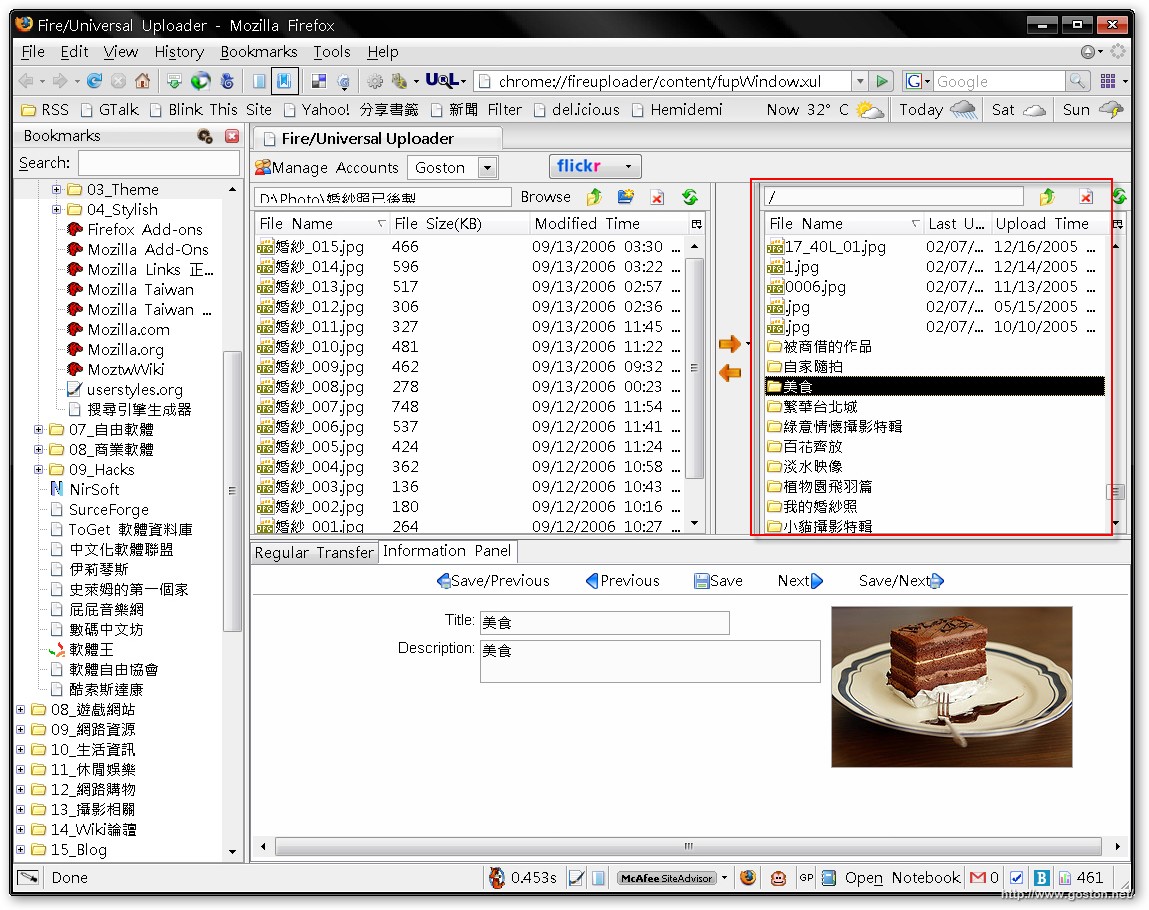
舉例來說: 如果我們想備份某一本「SET」的相片, 我們只要對著相對應的目錄按右鍵, 然後選擇下載即可; 下載回來的檔案就會自動放在以該「SET」名稱命名的目錄下, 而檔案名稱則會是該相片檔案在「Flickr」上「Title」欄位的描述 (「Title」重覆的會自動加上流水號), 夠方便吧!

那麼上傳呢? 如果我們想上傳一堆相片, 我們也可以把相片都放在一個目錄中, 然後點選目錄再進行上傳, 如此一次就能上傳該目錄中所有的相片。只是, 有點可惜的是當你上傳整個目錄時,「FireUploader」並不會自動幫你建立「SET」, 希望之後的版本能加上這個功能。

嘿嘿… 看完後, 手有沒有很癢的想馬上裝來玩玩啊!?

相關連結:

Technorati Tags: , , , , ,

Entry Filed under: Flickr, 軟體介紹, 電腦軟體

post to del.icio.us  post to MyShare  post to HEMiDEMi  post to funP

19 Comments Add your own

  • 1. 星子  |  2007/06/01 20:26

    嗯…..
    用來用去,還是覺得flickr uploadr最順手耶(不要打我)

    Using Mozilla Firefox Mozilla Firefox 2.0.0.3 on Windows Windows XP
  • 2. goston  |  2007/06/01 21:31

    @星子
    不會啦… FlickrUploadr 和 jUploadr 都蠻好用的啊… 只是如果要備份照片的話, 這個擴充套件可以考慮啦…

    Using Mozilla Firefox Mozilla Firefox 2.0.0.4 on Windows Windows XP
  • 3. rex  |  2007/06/01 22:01

    fantastic.mate,I both like it.Tks.

    Using Mozilla Firefox Mozilla Firefox 2.0.0.4 on Windows Windows XP
  • 4. zinklink  |  2007/06/02 00:34

    不同磁碟間的選擇還是要手動輸入,不是很方便

    Using Mozilla Firefox Mozilla Firefox 2.0.0.4 on Windows Windows XP
  • 5. goston  |  2007/06/02 00:58

    @zinklink
    它有個 Browse 的按鍵可以按啊…

    Using Mozilla Firefox Mozilla Firefox 2.0.0.4 on Windows Windows XP
  • 6. jslu  |  2007/06/02 02:27

    路過的客人想請問一下 Goston,你文中的圖在滑鼠點下去之後會有放大預覽的效果,請問這是如何做到的呀? :-)

    Using Mozilla Firefox Mozilla Firefox 2.0.0.4 on Windows Windows XP
  • 7. hof  |  2007/06/02 11:04

    為什麼我抓下的都是 *..undefined
    圖片的內容是 『THIS PHOTO IS CURRENTLY UNAVILABLE』

    Using Mozilla Firefox Mozilla Firefox 2.0.0.3 on Windows Windows XP
  • 8. hof  |  2007/06/02 11:08

    忘記說是 Flickr 的帳號

    Using Mozilla Firefox Mozilla Firefox 2.0.0.3 on Windows Windows XP
  • 9. goston  |  2007/06/02 23:25

    @jslu
    請參考這個網址

    @hof
    你有用你 Flickr 給 FireUploader 存取的權限了嗎?

    Using Mozilla Firefox Mozilla Firefox 2.0.0.4 on Windows Windows XP
  • 10. chitekim  |  2007/06/04 02:24

    真的是太好用啦!!
    謝謝你提供的資料..^^

    Using Mozilla Firefox Mozilla Firefox 2.0.0.4 on Windows Windows XP
  • 11. 星子  |  2007/06/06 08:30

    哇哈哈!
    我在CNET上面看到G大的美照
    好~~夢幻哦!

    Using Mozilla Firefox Mozilla Firefox 2.0.0.3 on Windows Windows XP
  • 12. goston  |  2007/06/06 09:08

    @星子
    呃… 想不到居然被發現了…
    那張是婚紗照啦… 和我本人不太像… XD

    Using Mozilla Firefox Mozilla Firefox 2.0.0.4 on Windows Windows XP
  • 13. 星子  |  2007/06/06 21:11

    最近接了mario的外稿
    偶而會上去晃
    瞭解一下文章風格
    沒想到……
    G大真是低調啊!

    Using Mozilla Firefox Mozilla Firefox 2.0.0.3 on Windows Windows XP
  • 14. Derek Hsu  |  2007/06/09 20:19

    Flickr Uploader傳輸照片時經常會發生一些奇怪的問題,有些照片就是傳不上去,有了這個東西,說不定可以解決我的問題喔,多謝!

    Using Mozilla Firefox Mozilla Firefox 2.0.0.4 on Windows Windows XP
  • 15. goston  |  2007/06/09 22:51

    @Derek Hsu
    也可以試試 jUploadr

    Using Mozilla Firefox Mozilla Firefox 2.0.0.4 on Windows Windows XP
  • 16. Life as Blogger» Bl&hellip  |  2007/06/25 00:11

    [...] 具体介绍可以看这里 [...]

    Using WordPress WordPress 2.2.1
  • 17. P’s & Love &raq&hellip  |  2007/08/23 17:15

    [...] [FF] 上下傳 Flickr、Picasa、YouTube 的檔案 – 方便強大的 Firefox Universal Uploader [...]

    Using WordPress WordPress 2.2.2
  • 18. Dominoes Blog» Blog&hellip  |  2008/02/07 07:31

    [...] 具体介绍可以看这里 [...]

    Using WordPress WordPress 2.0.5
  • 19. Sean Monkey  |  2008/05/10 22:55

    Good Information

    Using Mozilla Firefox Mozilla Firefox 2.0.0.14 on Windows Windows XP

Leave a Comment

Required

Required, hidden

Some HTML allowed:
<a href="" title=""> <abbr title=""> <acronym title=""> <b> <blockquote cite=""> <cite> <code> <del datetime=""> <em> <i> <q cite=""> <strike> <strong>

Trackback this post  |  Subscribe to the comments via RSS Feed


Donate Me

Related Posts

Recent Posts

Recent Comments